> ## Documentation Index
> Fetch the complete documentation index at: https://invopop-link-fix.mintlify.site/llms.txt
> Use this file to discover all available pages before exploring further.

# ZATCA supplier registration in Saudi Arabia

> Onboard a Saudi VAT-registered party with ZATCA and provision its production CSID.

export const saUnregisterWorkflow = {
  "name": "ZATCA unregister supplier",
  "description": "Removes a supplier's registration from Invopop's internal systems",
  "schema": "org/party",
  "steps": [{
    "id": "572ac450-6fcf-11f1-b09d-79f60b032746",
    "name": "Set state",
    "provider": "silo.state",
    "summary": "Set state to `processing`{.state .processing}",
    "config": {
      "state": "processing"
    }
  }, {
    "id": "5c0e9910-6fcf-11f1-b09d-79f60b032746",
    "name": "Unregister supplier from ZATCA",
    "provider": "gov-sa.party.unregister"
  }, {
    "id": "5e800e40-6fcf-11f1-b09d-79f60b032746",
    "name": "Set state",
    "provider": "silo.state",
    "summary": "Set state to `void`{.state .void}",
    "config": {
      "state": "void"
    }
  }],
  "rescue": [{
    "id": "60e4d940-6fcf-11f1-b09d-79f60b032746",
    "name": "Set state",
    "provider": "silo.state",
    "summary": "Set state to `error`{.state .error}",
    "config": {
      "state": "error"
    }
  }]
};

export const saRegisterWorkflow = {
  "name": "ZATCA register supplier",
  "description": "",
  "schema": "org/party",
  "steps": [{
    "id": "f60b2e30-6fce-11f1-b09d-79f60b032746",
    "name": "Set state",
    "provider": "silo.state",
    "summary": "Set state to `processing`{.state .processing}",
    "config": {
      "state": "processing"
    }
  }, {
    "id": "fd448bb0-6fce-11f1-b09d-79f60b032746",
    "name": "Register supplier with ZATCA",
    "provider": "gov-sa.party.register",
    "config": {
      "mode": "simulation"
    }
  }, {
    "id": "0064b770-6fcf-11f1-b09d-79f60b032746",
    "name": "Wait for OTP submission",
    "provider": "gov-sa.wait.authorization"
  }, {
    "id": "0236df60-6fcf-11f1-b09d-79f60b032746",
    "name": "Set state",
    "provider": "silo.state",
    "summary": "Set state to `registered`{.state .registered}",
    "config": {
      "state": "registered"
    }
  }],
  "rescue": [{
    "id": "04aa0240-6fcf-11f1-b09d-79f60b032746",
    "name": "Set state",
    "provider": "silo.state",
    "summary": "Set state to `error`{.state .error}",
    "config": {
      "state": "error"
    }
  }]
};

export const WorkflowDiagram = ({workflow}) => {
  const stateColors = {
    processing: "yellow",
    sent: "blue",
    received: "blue",
    registered: "green",
    completed: "green",
    error: "red"
  };
  const StateChip = ({state, label}) => <Badge size="sm" color={stateColors[state] || "gray"} icon="square-small" iconType="solid">
      {label.charAt(0).toUpperCase() + label.slice(1)}
    </Badge>;
  const providerIcons = {
    "silo.state": "https://silo.invopop.com/images/status.svg",
    "silo.close": "https://silo.invopop.com/images/check-badge.svg",
    "silo.if": "https://assets.invopop.com/apps/silo/if.svg",
    "silo.folder": "https://silo.invopop.com/images/folder.svg",
    "silo.modify": "https://silo.invopop.com/images/modify.svg",
    "silo.correct": "https://silo.invopop.com/images/replace.svg",
    "silo.sleep": "https://assets.invopop.com/icons/sleep.svg",
    silo: "https://assets.invopop.com/apps/silo/icon.svg",
    "sequence.enumerate": "https://sequence.invopop.com/images/enumerate.svg",
    "transform.job.create": "https://transform.invopop.com/images/jobs.svg",
    webhook: "https://webhook.invopop.com/icon.svg",
    lookup: "https://lookup.invopop.com/icon.png",
    dropbox: "https://dropbox.invopop.com/icon.png",
    pdf: "https://pdf.invopop.com/file-pdf.svg",
    peppol: "https://assets.invopop.com/apps/peppol/icon.svg",
    ubl: "https://assets.invopop.com/apps/ubl/logo.svg",
    cii: "https://assets.invopop.com/apps/cii/logo.svg",
    "gov-fr": "https://assets.invopop.com/flags/fr.svg",
    "chorus-pro": "https://assets.invopop.com/apps/chroruspro/icon.svg",
    "gov-es": "https://assets.invopop.com/apps/gov-es/icon.svg",
    "gov-es.sii": "https://assets.invopop.com/apps/sii/icon.svg",
    "gov-es.ticketbai": "https://assets.invopop.com/apps/ticketbai/icon.svg",
    "gov-es.facturae": "https://assets.invopop.com/apps/facturae/icon.svg",
    verifactu: "https://assets.invopop.com/apps/verifactu/icon.svg",
    "gov-pl": "https://assets.invopop.com/apps/ksef/icon.svg",
    "gov-sa": "https://assets.invopop.com/apps/zatca/icon.svg",
    "gov-ar": "https://assets.invopop.com/apps/arca/icon.svg",
    "at-pt": "https://assets.invopop.com/apps/at-pt/icon.svg",
    "sat-mx": "https://assets.invopop.com/apps/sat-mexico/icon.svg",
    "sw-sapien": "https://assets.invopop.com/apps/sw-sapien/icon.svg",
    "sdi-it": "https://assets.invopop.com/apps/sdi-italy/icon.svg",
    "ticket-it": "https://assets.invopop.com/apps/agenzia-entrate/icon.svg",
    "nfe-br": "https://assets.invopop.com/apps/notas-fiscais-eletronicas-brazil/icon.svg",
    chargebee: "https://assets.invopop.com/apps/chargebee/icon.svg",
    stripe: "https://assets.invopop.com/apps/stripe/icon.svg",
    email: "https://assets.invopop.com/apps/email/icon.svg",
    cron: "https://assets.invopop.com/apps/cron/icon.svg",
    ilyda: "https://assets.invopop.com/apps/ilyda/icon.svg",
    invoicexpress: "https://assets.invopop.com/apps/invoicexpress/icon.svg",
    plemsi: "https://assets.invopop.com/flags/co.svg"
  };
  const iconFor = provider => {
    const parts = (provider || "").split(".");
    for (let i = parts.length; i > 0; i--) {
      const url = providerIcons[parts.slice(0, i).join(".")];
      if (url) return url;
    }
    return null;
  };
  const StepIcon = ({provider}) => {
    const url = iconFor(provider);
    return <span title={provider} className="flex h-7 w-7 shrink-0 items-center justify-center rounded-md border border-gray-950/10 bg-white dark:border-white/10 dark:bg-white/5">
        {url ? <img src={url} alt="" className="h-4 w-4" /> : null}
      </span>;
  };
  const renderSummary = summary => {
    const nodes = [];
    const re = /`([^`]+)`(\{[^}]*\})?/g;
    let last = 0;
    let m;
    let k = 0;
    while ((m = re.exec(summary)) !== null) {
      if (m.index > last) nodes.push(summary.slice(last, m.index));
      const attrs = m[2] || "";
      if (attrs.indexOf(".state") >= 0) {
        const state = (attrs.match(/\.state\s+\.([\w-]+)/) || [])[1] || m[1];
        nodes.push(<StateChip key={k++} state={state} label={m[1]} />);
      } else if (attrs) {
        nodes.push(<span key={k++} className="text-sm font-medium text-gray-700 dark:text-gray-300">
            {m[1]}
          </span>);
      } else {
        nodes.push(<code key={k++} className="text-sm rounded bg-gray-100 px-1 font-mono text-sm dark:bg-white/10">
            {m[1]}
          </code>);
      }
      last = m.index + m[0].length;
    }
    if (last < summary.length) nodes.push(summary.slice(last));
    return nodes;
  };
  const NoteRow = ({text}) => <div className="mt-4 mb-1 font-mono text-sm leading-5 text-gray-400 dark:text-gray-500">{"// " + text}</div>;
  const renderSteps = (steps, counter) => (steps || []).map(step => {
    counter.n += 1;
    const n = counter.n;
    const branches = (step.next || []).filter(b => b.steps && b.steps.length > 0);
    return <div key={step.id || "step-" + n}>
          {step.notes ? <NoteRow text={step.notes} /> : null}
          <div className="mt-2.5 flex items-center">
            <span className="absolute left-0 w-10 text-center font-mono text-sm text-gray-400 select-none dark:text-gray-500">
              {n}
            </span>
            <div className="flex min-w-0 flex-1 items-center gap-2 rounded-xl border border-gray-950/5 bg-white px-2 py-2 dark:border-white/10 dark:bg-gray-900">
              <StepIcon provider={step.provider} />
              <span className="text-sm shrink-0 font-medium text-gray-900 dark:text-gray-100">{step.name}</span>
              {step.summary ? <span className="text-sm min-w-0 truncate text-gray-500 dark:text-gray-400">{renderSummary(step.summary)}</span> : null}
            </div>
          </div>
          {branches.length > 0 ? <div className="ml-5 border-l border-gray-200 -my-1 py-1 pl-6 dark:border-white/10">
              {branches.map((branch, bi) => <div key={branch.code || branch.status || bi}>
                  <div className="mt-4">
                    <span className="rounded-md bg-gray-200/70 px-2 py-1 font-mono text-sm text-gray-600 dark:bg-white/10 dark:text-gray-300">
                      {branch.code || branch.status}
                    </span>
                  </div>
                  {renderSteps(branch.steps, counter)}
                </div>)}
            </div> : null}
        </div>;
  });
  const counter = {
    n: 0
  };
  const wf = workflow || ({});
  return <div className="not-prose relative my-5 rounded-2xl border border-gray-950/5 bg-gray-50 py-3 pr-4 pb-5 pl-12 dark:border-white/10 dark:bg-white/[0.03]">
      {renderSteps(wf.steps, counter)}
      {wf.rescue && wf.rescue.length > 0 ? <div className="mt-6 border-t border-dashed border-gray-300 dark:border-white/10">
          <NoteRow text="If any step fails" />
          {renderSteps(wf.rescue, counter)}
        </div> : null}
    </div>;
};

<Note>
  Registration is required for any Saudi VAT number that will clear or report invoices through Invopop. It is a prerequisite for the [clearance and reporting](/guides/sa-zatca-clearance-reporting) flow.
</Note>

## Sandbox environments

In sandbox, the **Register Party** step's configuration selects which ZATCA portal to onboard against. Production enrollments ignore this and always use the live endpoint.

| Mode                   | Target                           | OTP in the wizard                                                           | Use it to                                                                                             |
| ---------------------- | -------------------------------- | --------------------------------------------------------------------------- | ----------------------------------------------------------------------------------------------------- |
| `developer`            | ZATCA Developer (sandbox) portal | **Dummy** — any placeholder value is accepted                               | Test the onboarding flow end to end without touching a real ZATCA account.                            |
| `simulation` (default) | ZATCA Simulation portal          | **Real** — must be generated from the supplier's FATOORA Simulation account | Rehearse the production onboarding with genuine certificates and compliance checks before going live. |

The two modes target different ZATCA sandbox endpoints and differ mainly in how the OTP is treated:

* **Developer** is the lightweight sandbox. ZATCA does not validate the OTP, so the value the supplier types in the [onboarding wizard](#the-onboarding-wizard) is a dummy.

  You can **register any party** in developer mode, but ZATCA only accepts **invoices issued from its fixed test VAT number, `399999999900003`**.
* **Simulation** mirrors production. The OTP must be a **real** one-time password the supplier generates from their FATOORA *Simulation* portal, exactly as they would in production.

<Note>
  In both sandbox modes the supplier still completes the same wizard, only the OTP requirement changes.
</Note>

## How it works

Registration spans two parts: a workflow you run against the party document, and a hosted onboarding wizard the supplier completes to provide the FATOORA OTP.

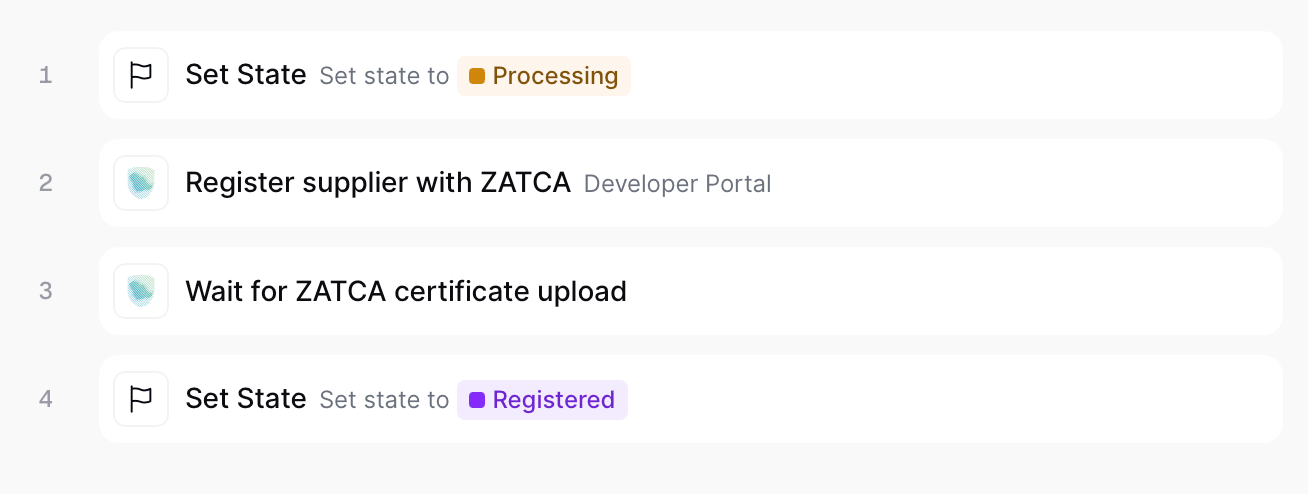
<Frame caption="ZATCA register supplier">
  <img src="https://mintcdn.com/invopop-link-fix/1lP6Ab0d1FMqmHMb/assets/guides/sa-register-supplier.png?fit=max&auto=format&n=1lP6Ab0d1FMqmHMb&q=85&s=c994ff01d282f06e93cffe4f02f14bb0" width="640" data-path="assets/guides/sa-register-supplier.png" />
</Frame>

<Steps>
  <Step title="Set State → Processing">
    Sets the state of the silo entry as "Processing".
  </Step>

  <Step title="Register supplier with ZATCA">
    Validates the party's identity and full address, then publishes a public onboarding link in the meta section of the party. The supplier follows this link to complete the onboarding wizard.
  </Step>

  <Step title="Wait for ZATCA certificate upload">
    Pauses until the supplier uploads the compliance CSID. It will then submit the mandatory compliance sample invoices and swaps the Compliance CSID with the Production CSID.
  </Step>

  <Step title="Set State → Registered">
    Sets the state of the silo entry as "Registered".
  </Step>
</Steps>

<Card iconType="duotone" title="ZATCA register party workflow" icon="code-branch" href="https://console.invopop.com/redirect/workflows/new?template=sa-sa-register" horizontal>
  Add to my workspace →
</Card>

<Tabs>
  <Tab title="Workflow">
    <WorkflowDiagram workflow={saRegisterWorkflow} />
  </Tab>

  <Tab title="Code">
    Copy and paste into a new [Empty Party workflow](https://console.invopop.com/redirect/workflows/new?template=empty-party).

    ```json Example ZATCA register supplier workflow theme={null}
    {
        "name": "ZATCA register supplier",
        "description": "",
        "schema": "org/party",
        "steps": [
            {
                "id": "f60b2e30-6fce-11f1-b09d-79f60b032746",
                "name": "Set state",
                "provider": "silo.state",
                "summary": "Set state to `processing`{.state .processing}",
                "config": {
                    "state": "processing"
                }
            },
            {
                "id": "fd448bb0-6fce-11f1-b09d-79f60b032746",
                "name": "Register supplier with ZATCA",
                "provider": "gov-sa.party.register",
                "config": {
                    "mode": "simulation"
                }
            },
            {
                "id": "0064b770-6fcf-11f1-b09d-79f60b032746",
                "name": "Wait for OTP submission",
                "provider": "gov-sa.wait.authorization"
            },
            {
                "id": "0236df60-6fcf-11f1-b09d-79f60b032746",
                "name": "Set state",
                "provider": "silo.state",
                "summary": "Set state to `registered`{.state .registered}",
                "config": {
                    "state": "registered"
                }
            }
        ],
        "rescue": [
            {
                "id": "04aa0240-6fcf-11f1-b09d-79f60b032746",
                "name": "Set state",
                "provider": "silo.state",
                "summary": "Set state to `error`{.state .error}",
                "config": {
                    "state": "error"
                }
            }
        ]
    }
    ```
  </Tab>
</Tabs>

## The onboarding wizard

The link published by **Register Party** provides an onboarding wizard for the supplier to complete:

<Steps>
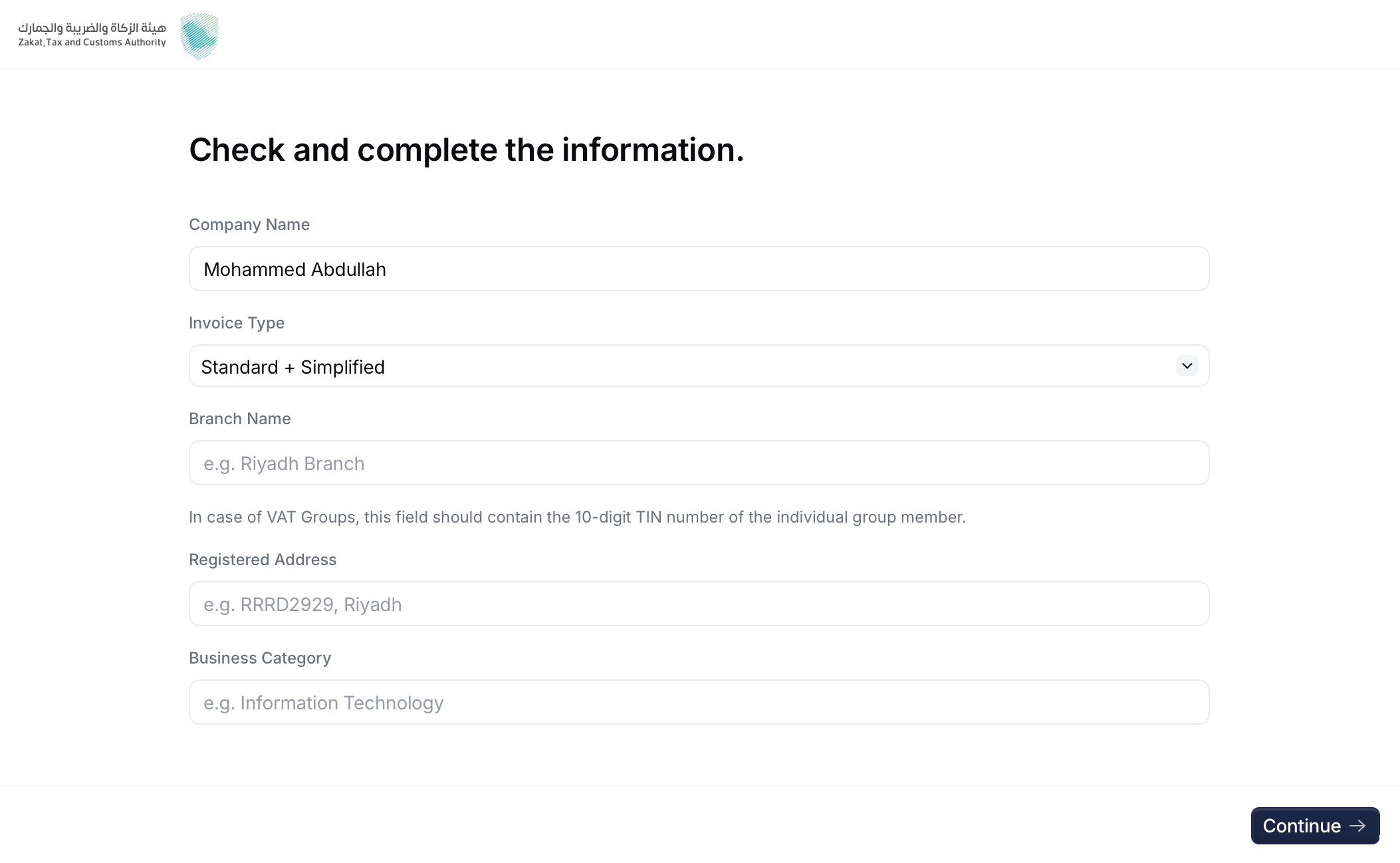
  <Step title="Company details">
    <Frame caption="Company details screen">
      <img src="https://mintcdn.com/invopop-link-fix/1lP6Ab0d1FMqmHMb/assets/guides/sa-wizard-1.png?fit=max&auto=format&n=1lP6Ab0d1FMqmHMb&q=85&s=0367d087bfdcab19f2fdc2109b1af2b3" width="640" data-path="assets/guides/sa-wizard-1.png" />
    </Frame>

    The supplier confirms the legal name and provides the **invoice type** (`1000` standard, `0100` simplified, or `1100` both), **branch name**, **registered address**, and **business category**. These values feed the certificate request.
  </Step>

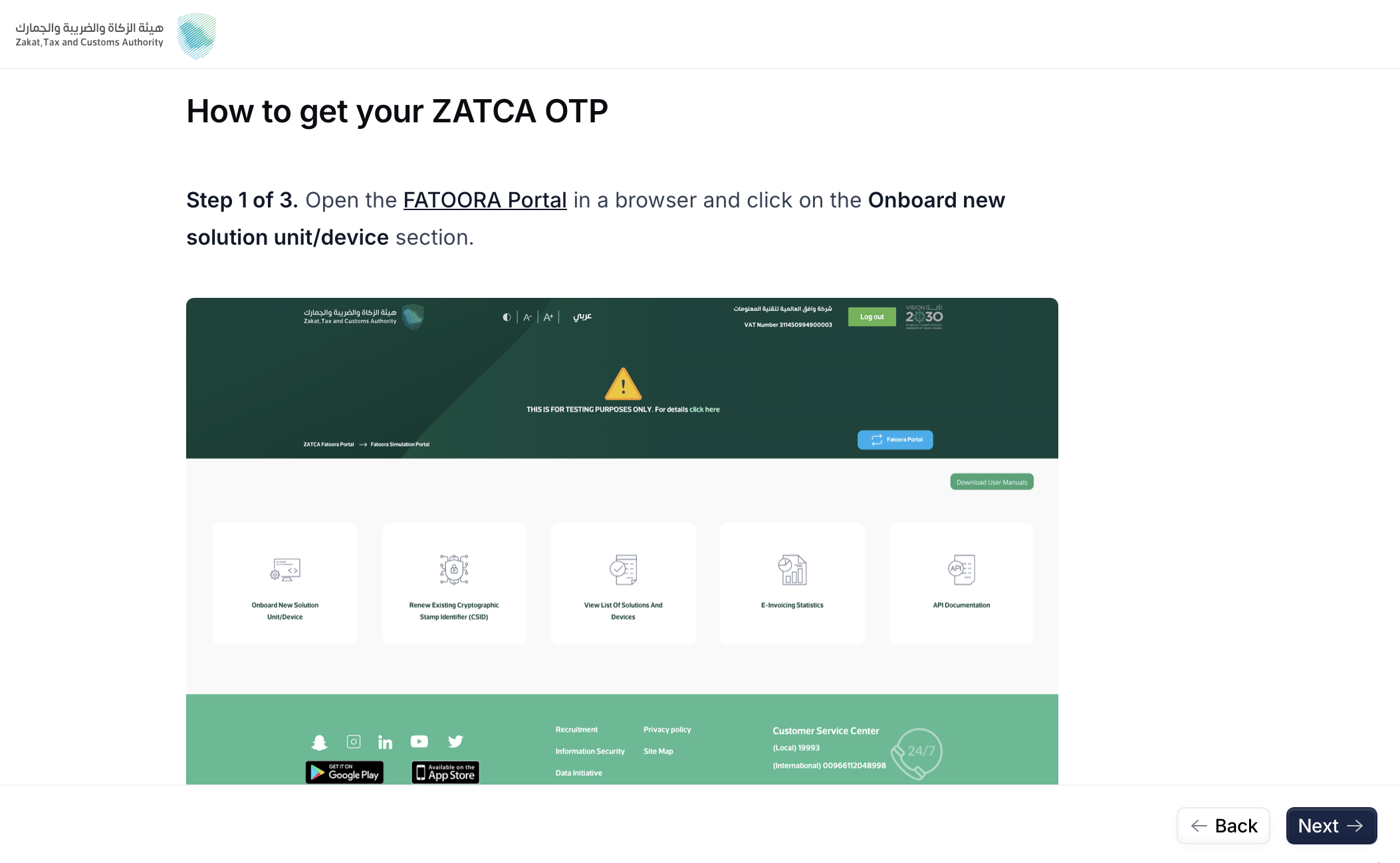
  <Step title="Get the OTP from FATOORA">
    <Frame caption="FATOORA instructions screen">
      <img src="https://mintcdn.com/invopop-link-fix/1lP6Ab0d1FMqmHMb/assets/guides/sa-wizard-2.png?fit=max&auto=format&n=1lP6Ab0d1FMqmHMb&q=85&s=036945ca17309420e7375009070d9d44" width="640" data-path="assets/guides/sa-wizard-2.png" />
    </Frame>

    The supplier signs in to the FATOORA portal and generates a One-Time Password for the EGS unit. The wizard shows the relevant FATOORA screens.
  </Step>

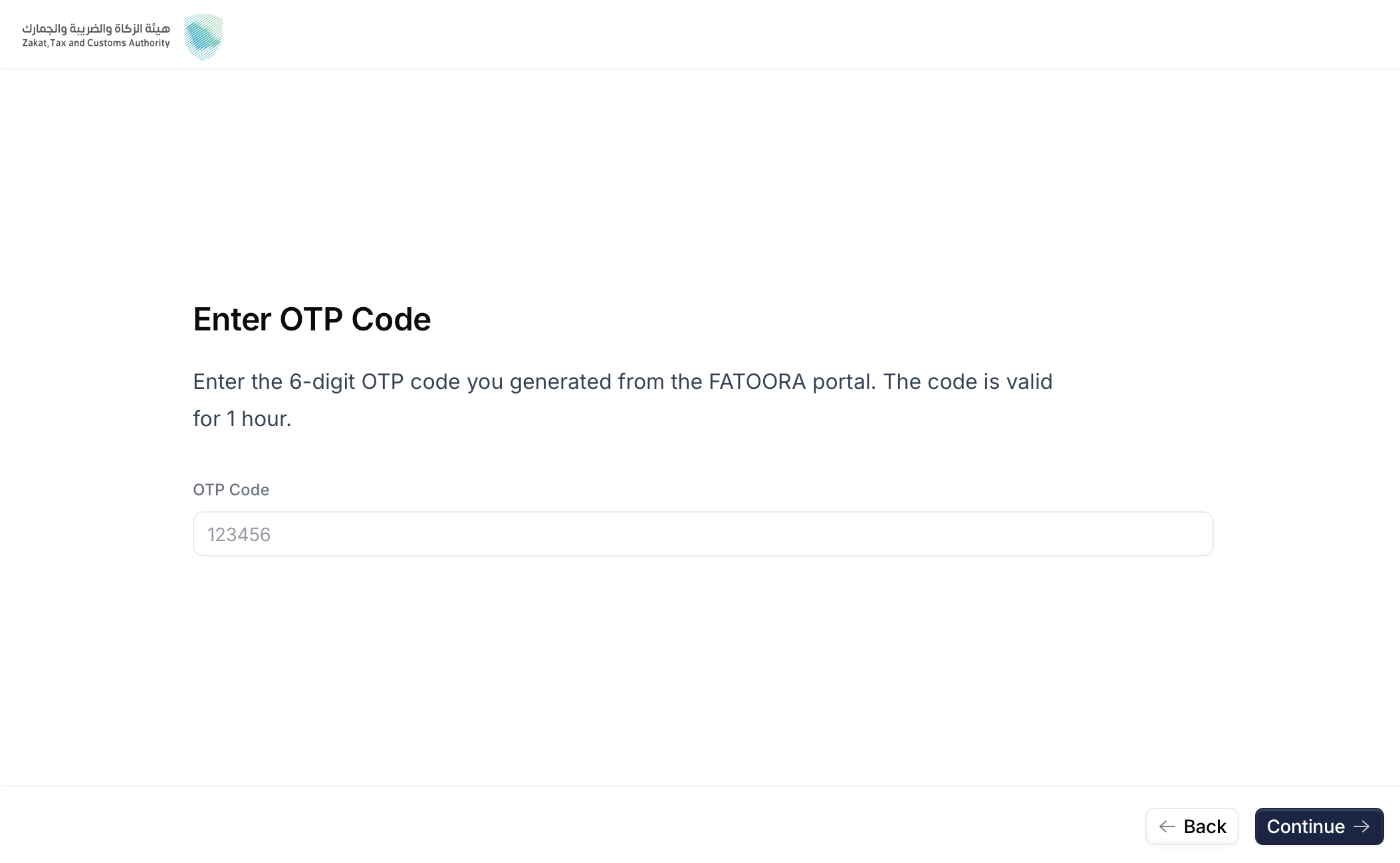
  <Step title="Enter the OTP">
    <Frame caption="OTP Code screen">
      <img src="https://mintcdn.com/invopop-link-fix/1lP6Ab0d1FMqmHMb/assets/guides/sa-wizard-3.png?fit=max&auto=format&n=1lP6Ab0d1FMqmHMb&q=85&s=2d77df5b286688f29dcde836de625bb5" width="640" data-path="assets/guides/sa-wizard-3.png" />
    </Frame>

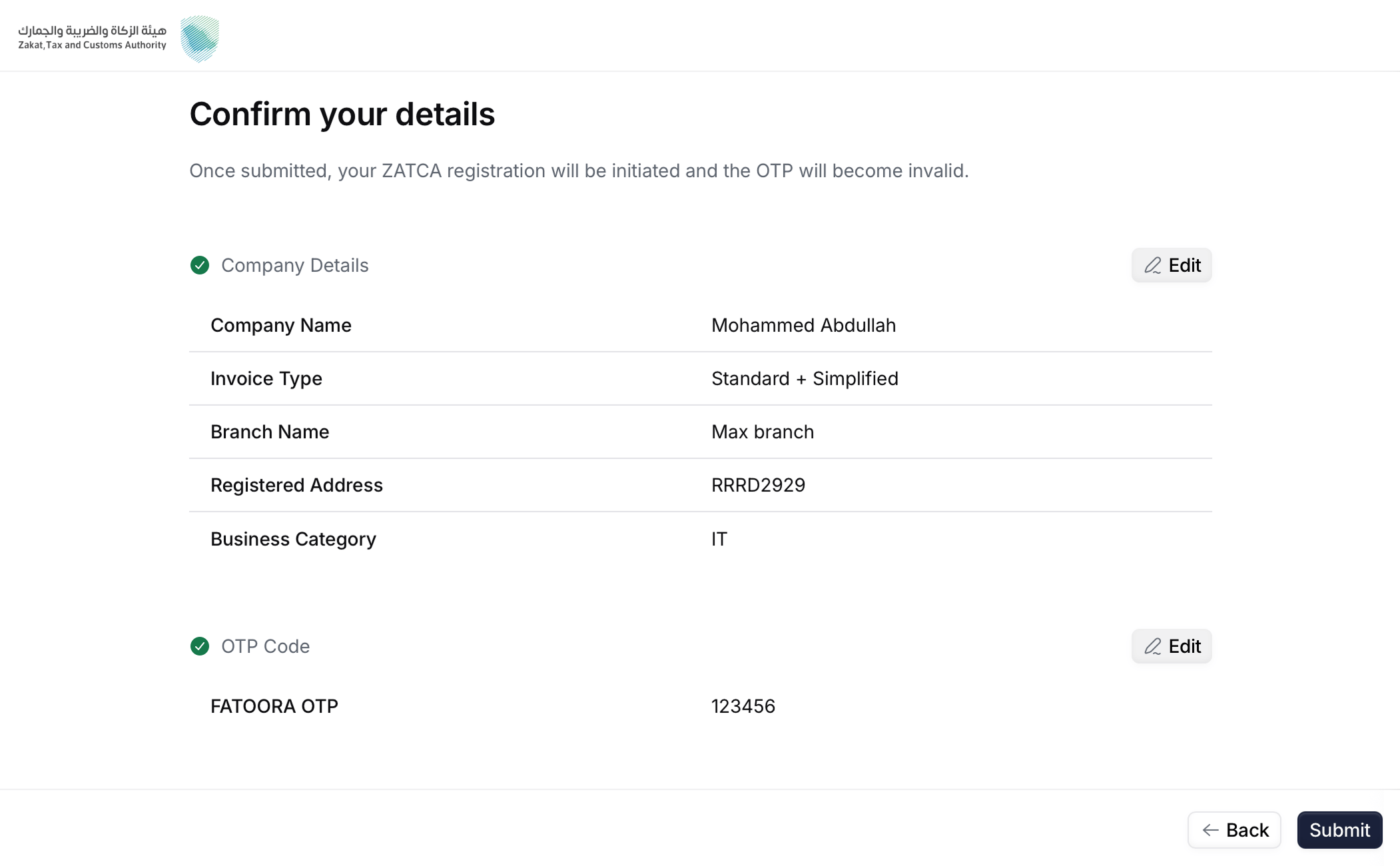
    The supplier pastes the OTP and reviews the recap of the details that will be sent to ZATCA.
  </Step>

  <Step title="Confirm details">
    <Frame caption="Confirmation screen">
      <img src="https://mintcdn.com/invopop-link-fix/1lP6Ab0d1FMqmHMb/assets/guides/sa-wizard-4.png?fit=max&auto=format&n=1lP6Ab0d1FMqmHMb&q=85&s=58d5c61d419bf33152b6f572b6592335" width="640" data-path="assets/guides/sa-wizard-4.png" />
    </Frame>

    Here you will make sure all the details you entered were correct. Click "Back" if you need to change anything.
  </Step>

  <Step title="Submit">
    <Frame caption="Submission screen">
      <img src="https://mintcdn.com/invopop-link-fix/1lP6Ab0d1FMqmHMb/assets/guides/sa-wizard-5.png?fit=max&auto=format&n=1lP6Ab0d1FMqmHMb&q=85&s=08b2d4c632c779dbdfd3e1d574bdb2e0" width="640" data-path="assets/guides/sa-wizard-5.png" />
    </Frame>

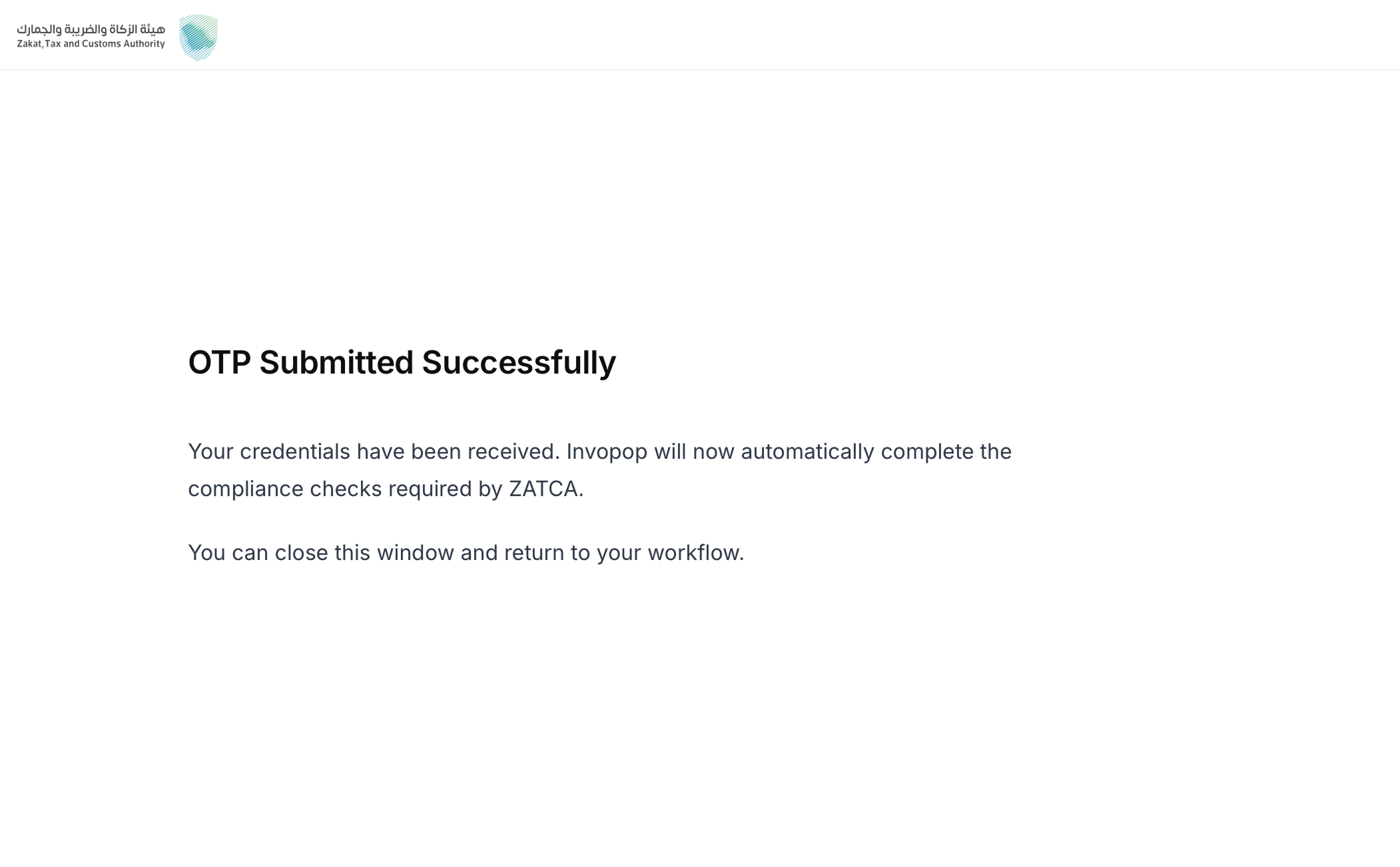
    Upon submit, Invopop requests the **Compliance CSID**, and stores the credentials. This unblocks the **Wait for ZATCA certificate upload** step in the workflow.
  </Step>
</Steps>

<Info>
  The invoice type chosen here determines which compliance samples Invopop submits: `1000` runs standard tax invoices, credit notes, and debit notes; `0100` runs the simplified equivalents; `1100` runs both sets.
</Info>

## Unregistration (sandbox only)

Unregistering a party from ZATCA in production environment is handled by the **taxpayers**, directly in the **FATOORA portal**, signing in with their own credentials.

Invopop also provides an unregister action that removes the party and its stored credentials from **Invopop's internal systems only**. It does not touch the party's registration with ZATCA.

<Warning>
  This action is intended for **testing in sandbox** — for example, to re-onboard the same VAT during development. It is **not** for live environments; unregistering at ZATCA is always done by the taxpayer in the FATOORA portal.
</Warning>

<Card iconType="duotone" title="ZATCA unregister supplier workflow (sandbox only)" icon="code-branch" href="https://console.invopop.com/redirect/workflows/new?template=sa-sa-unregister" horizontal>
  Add to my workspace →
</Card>

<Tabs>
  <Tab title="Workflow">
    <WorkflowDiagram workflow={saUnregisterWorkflow} />
  </Tab>

  <Tab title="Code">
    Copy and paste into a new [Empty Party workflow](https://console.invopop.com/redirect/workflows/new?template=empty-party).

    ```json Example ZATCA unregister supplier workflow theme={null}
    {
        "name": "ZATCA unregister supplier",
        "description": "Removes a supplier's registration from Invopop's internal systems",
        "schema": "org/party",
        "steps": [
            {
                "id": "572ac450-6fcf-11f1-b09d-79f60b032746",
                "name": "Set state",
                "provider": "silo.state",
                "summary": "Set state to `processing`{.state .processing}",
                "config": {
                    "state": "processing"
                }
            },
            {
                "id": "5c0e9910-6fcf-11f1-b09d-79f60b032746",
                "name": "Unregister supplier from ZATCA",
                "provider": "gov-sa.party.unregister"
            },
            {
                "id": "5e800e40-6fcf-11f1-b09d-79f60b032746",
                "name": "Set state",
                "provider": "silo.state",
                "summary": "Set state to `void`{.state .void}",
                "config": {
                    "state": "void"
                }
            }
        ],
        "rescue": [
            {
                "id": "60e4d940-6fcf-11f1-b09d-79f60b032746",
                "name": "Set state",
                "provider": "silo.state",
                "summary": "Set state to `error`{.state .error}",
                "config": {
                    "state": "error"
                }
            }
        ]
    }
    ```
  </Tab>
</Tabs>

## FAQ

<AccordionGroup>
  <Accordion title="What do I need to onboard a party with ZATCA?">
    A workspace with the **Saudi Arabia** app enabled, and an `org/party` (the supplier) carrying:

    * a Saudi **VAT registration number**,
    * an **identity** of type `CRN`, `MOM`, `MLS`, `700`, `SAG`, or `OTH`, and
    * a complete **national address** (building number, postal code, district, street, additional street, and country).

    During the hosted onboarding wizard the supplier also provides the legal name, invoice type (`1000` standard / `0100` simplified / `1100` both), branch name, registered address, and business category — plus the FATOORA OTP.
  </Accordion>

  <Accordion title="How long is the OTP valid?">
    **1 hour** from when it is generated in the FATOORA portal. If it expires, generate a new one and re-enter it in the wizard.
  </Accordion>

  <Accordion title="What is the difference between Developer and Simulation sandbox modes?">
    In **Developer** mode the OTP is not validated (any placeholder works) and you can only send invoices from ZATCA's fixed test VAT `399999999900003`. In **Simulation** mode the OTP must be real and you can send from any registered party.
  </Accordion>

  <Accordion title="Can I test in Simulation without a real FATOORA account?">
    No. Simulation requires a real FATOORA account and taxpayer to generate a valid OTP. Use **Developer** mode if you want to test the flow without a real account.
  </Accordion>
</AccordionGroup>

More available in our [Saudi Arabia FAQ](/faq/saudi-arabia) section.

***

<AccordionGroup>
  <Accordion title="🇸🇦 Invopop resources for Saudi Arabia">
    |            |                                                                                                                                                                                                                                               |
    | ---------- | --------------------------------------------------------------------------------------------------------------------------------------------------------------------------------------------------------------------------------------------- |
    | Compliance | <Icon icon="https://assets.invopop.com/flags/sa.svg" /> [Invoicing compliance in Saudi Arabia](/compliance/saudi-arabia)<br /> <Icon icon="timeline" /> [Compliance timeline](/timelines/saudi-arabia)                                        |
    | Apps       | <Icon icon="https://assets.invopop.com/flags/sa.svg" /> [Saudi Arabia](/apps/saudi-arabia)                                                                                                                                                    |
    | Guides     | <Icon icon="book" /> [Registration](/guides/sa-zatca-registration)<br /><Icon icon="book" /> [Clearance & reporting](/guides/sa-zatca-clearance-reporting)                                                                                    |
    | FAQ        | <Icon icon="square-question" /> [Saudi Arabia FAQ](/faq/saudi-arabia)                                                                                                                                                                         |
    | GOBL       | <Icon icon="https://assets.invopop.com/icons/gobl.svg" /> [Saudi Arabia Tax Regime](https://docs.gobl.org/regimes/sa)<br /> <Icon icon="https://assets.invopop.com/icons/gobl.svg" /> [ZATCA Addon](https://docs.gobl.org/addons/sa-zatca-v1) |
    | GitHub     | <Icon icon="github" /> [gobl.sa.zatca](https://github.com/invopop/gobl.sa.zatca)                                                                                                                                                              |
  </Accordion>
</AccordionGroup>

<Card title="Participate in our community" icon="forumbee" href="https://community.invopop.com" arrow="true" horizontal>
  Ask and answer questions about invoicing in Saudi Arabia →
</Card>