> ## Documentation Index
> Fetch the complete documentation index at: https://invopop-link-fix.mintlify.site/llms.txt
> Use this file to discover all available pages before exploring further.

# Smart Receipts issuing guide

> Issue e-receipts in Italy

export const itTicketVoidReceiptWorkflow = {
  "name": "Smart Receipts void receipt",
  "description": "Void an Italian *documento commerciale* on AdE",
  "schema": "bill/invoice",
  "steps": [{
    "id": "02a62be0-2b2e-11f0-984e-0542d5f28f0b",
    "name": "Void receipt with AdE",
    "provider": "ticket-it.void"
  }, {
    "id": "1583e220-2b2e-11f0-984e-0542d5f28f0b",
    "name": "Set state",
    "provider": "silo.state",
    "summary": "Set state to `void`{.state .void}",
    "config": {
      "state": "void"
    }
  }],
  "rescue": [{
    "id": "25c98860-2b2e-11f0-984e-0542d5f28f0b",
    "name": "Set state",
    "provider": "silo.state",
    "summary": "Set state to `error`{.state .error}",
    "config": {
      "state": "error"
    }
  }]
};

export const itTicketSendWorkflow = {
  "name": "Smart Receipts issue receipt",
  "description": "Issue an Italian *documento commerciale* via AdE",
  "schema": "bill/invoice",
  "steps": [{
    "id": "0b0bdb00-25b5-11f0-864a-193f213df097",
    "name": "Sign envelope",
    "provider": "silo.close"
  }, {
    "id": "04427d60-25b5-11f0-864a-193f213df097",
    "name": "Send receipt to AdE",
    "provider": "ticket-it.send"
  }, {
    "id": "9e973e00-2b2d-11f0-984e-0542d5f28f0b",
    "name": "Generate PDF",
    "provider": "pdf",
    "summary": "Italian · A4",
    "config": {
      "logo_height": 40,
      "locale": "it",
      "date_format": "%Y-%m-%d",
      "layout": "A4"
    }
  }, {
    "id": "112326b0-25b5-11f0-864a-193f213df097",
    "name": "Set state",
    "provider": "silo.state",
    "summary": "Set state to `sent`{.state .sent}",
    "config": {
      "state": "sent"
    }
  }],
  "rescue": [{
    "id": "194a66a0-25b5-11f0-864a-193f213df097",
    "name": "Set state",
    "provider": "silo.state",
    "summary": "Set state to `error`{.state .error}",
    "config": {
      "state": "error"
    }
  }]
};

export const WorkflowDiagram = ({workflow}) => {
  const stateColors = {
    processing: "yellow",
    sent: "blue",
    received: "blue",
    registered: "green",
    completed: "green",
    error: "red"
  };
  const StateChip = ({state, label}) => <Badge size="sm" color={stateColors[state] || "gray"} icon="square-small" iconType="solid">
      {label.charAt(0).toUpperCase() + label.slice(1)}
    </Badge>;
  const providerIcons = {
    "silo.state": "https://silo.invopop.com/images/status.svg",
    "silo.close": "https://silo.invopop.com/images/check-badge.svg",
    "silo.if": "https://assets.invopop.com/apps/silo/if.svg",
    "silo.folder": "https://silo.invopop.com/images/folder.svg",
    "silo.modify": "https://silo.invopop.com/images/modify.svg",
    "silo.correct": "https://silo.invopop.com/images/replace.svg",
    "silo.sleep": "https://assets.invopop.com/icons/sleep.svg",
    silo: "https://assets.invopop.com/apps/silo/icon.svg",
    "sequence.enumerate": "https://sequence.invopop.com/images/enumerate.svg",
    "transform.job.create": "https://transform.invopop.com/images/jobs.svg",
    webhook: "https://webhook.invopop.com/icon.svg",
    lookup: "https://lookup.invopop.com/icon.png",
    dropbox: "https://dropbox.invopop.com/icon.png",
    pdf: "https://pdf.invopop.com/file-pdf.svg",
    peppol: "https://assets.invopop.com/apps/peppol/icon.svg",
    ubl: "https://assets.invopop.com/apps/ubl/logo.svg",
    cii: "https://assets.invopop.com/apps/cii/logo.svg",
    "gov-fr": "https://assets.invopop.com/flags/fr.svg",
    "chorus-pro": "https://assets.invopop.com/apps/chroruspro/icon.svg",
    "gov-es": "https://assets.invopop.com/apps/gov-es/icon.svg",
    "gov-es.sii": "https://assets.invopop.com/apps/sii/icon.svg",
    "gov-es.ticketbai": "https://assets.invopop.com/apps/ticketbai/icon.svg",
    "gov-es.facturae": "https://assets.invopop.com/apps/facturae/icon.svg",
    verifactu: "https://assets.invopop.com/apps/verifactu/icon.svg",
    "gov-pl": "https://assets.invopop.com/apps/ksef/icon.svg",
    "gov-sa": "https://assets.invopop.com/apps/zatca/icon.svg",
    "gov-ar": "https://assets.invopop.com/apps/arca/icon.svg",
    "at-pt": "https://assets.invopop.com/apps/at-pt/icon.svg",
    "sat-mx": "https://assets.invopop.com/apps/sat-mexico/icon.svg",
    "sw-sapien": "https://assets.invopop.com/apps/sw-sapien/icon.svg",
    "sdi-it": "https://assets.invopop.com/apps/sdi-italy/icon.svg",
    "ticket-it": "https://assets.invopop.com/apps/agenzia-entrate/icon.svg",
    "nfe-br": "https://assets.invopop.com/apps/notas-fiscais-eletronicas-brazil/icon.svg",
    chargebee: "https://assets.invopop.com/apps/chargebee/icon.svg",
    stripe: "https://assets.invopop.com/apps/stripe/icon.svg",
    email: "https://assets.invopop.com/apps/email/icon.svg",
    cron: "https://assets.invopop.com/apps/cron/icon.svg",
    ilyda: "https://assets.invopop.com/apps/ilyda/icon.svg",
    invoicexpress: "https://assets.invopop.com/apps/invoicexpress/icon.svg",
    plemsi: "https://assets.invopop.com/flags/co.svg"
  };
  const iconFor = provider => {
    const parts = (provider || "").split(".");
    for (let i = parts.length; i > 0; i--) {
      const url = providerIcons[parts.slice(0, i).join(".")];
      if (url) return url;
    }
    return null;
  };
  const StepIcon = ({provider}) => {
    const url = iconFor(provider);
    return <span title={provider} className="flex h-7 w-7 shrink-0 items-center justify-center rounded-md border border-gray-950/10 bg-white dark:border-white/10 dark:bg-white/5">
        {url ? <img src={url} alt="" className="h-4 w-4" /> : null}
      </span>;
  };
  const renderSummary = summary => {
    const nodes = [];
    const re = /`([^`]+)`(\{[^}]*\})?/g;
    let last = 0;
    let m;
    let k = 0;
    while ((m = re.exec(summary)) !== null) {
      if (m.index > last) nodes.push(summary.slice(last, m.index));
      const attrs = m[2] || "";
      if (attrs.indexOf(".state") >= 0) {
        const state = (attrs.match(/\.state\s+\.([\w-]+)/) || [])[1] || m[1];
        nodes.push(<StateChip key={k++} state={state} label={m[1]} />);
      } else if (attrs) {
        nodes.push(<span key={k++} className="text-sm font-medium text-gray-700 dark:text-gray-300">
            {m[1]}
          </span>);
      } else {
        nodes.push(<code key={k++} className="text-sm rounded bg-gray-100 px-1 font-mono text-sm dark:bg-white/10">
            {m[1]}
          </code>);
      }
      last = m.index + m[0].length;
    }
    if (last < summary.length) nodes.push(summary.slice(last));
    return nodes;
  };
  const NoteRow = ({text}) => <div className="mt-4 mb-1 font-mono text-sm leading-5 text-gray-400 dark:text-gray-500">{"// " + text}</div>;
  const renderSteps = (steps, counter) => (steps || []).map(step => {
    counter.n += 1;
    const n = counter.n;
    const branches = (step.next || []).filter(b => b.steps && b.steps.length > 0);
    return <div key={step.id || "step-" + n}>
          {step.notes ? <NoteRow text={step.notes} /> : null}
          <div className="mt-2.5 flex items-center">
            <span className="absolute left-0 w-10 text-center font-mono text-sm text-gray-400 select-none dark:text-gray-500">
              {n}
            </span>
            <div className="flex min-w-0 flex-1 items-center gap-2 rounded-xl border border-gray-950/5 bg-white px-2 py-2 dark:border-white/10 dark:bg-gray-900">
              <StepIcon provider={step.provider} />
              <span className="text-sm shrink-0 font-medium text-gray-900 dark:text-gray-100">{step.name}</span>
              {step.summary ? <span className="text-sm min-w-0 truncate text-gray-500 dark:text-gray-400">{renderSummary(step.summary)}</span> : null}
            </div>
          </div>
          {branches.length > 0 ? <div className="ml-5 border-l border-gray-200 -my-1 py-1 pl-6 dark:border-white/10">
              {branches.map((branch, bi) => <div key={branch.code || branch.status || bi}>
                  <div className="mt-4">
                    <span className="rounded-md bg-gray-200/70 px-2 py-1 font-mono text-sm text-gray-600 dark:bg-white/10 dark:text-gray-300">
                      {branch.code || branch.status}
                    </span>
                  </div>
                  {renderSteps(branch.steps, counter)}
                </div>)}
            </div> : null}
        </div>;
  });
  const counter = {
    n: 0
  };
  const wf = workflow || ({});
  return <div className="not-prose relative my-5 rounded-2xl border border-gray-950/5 bg-gray-50 py-3 pr-4 pb-5 pl-12 dark:border-white/10 dark:bg-white/[0.03]">
      {renderSteps(wf.steps, counter)}
      {wf.rescue && wf.rescue.length > 0 ? <div className="mt-6 border-t border-dashed border-gray-300 dark:border-white/10">
          <NoteRow text="If any step fails" />
          {renderSteps(wf.rescue, counter)}
        </div> : null}
    </div>;
};

## Introduction

Invopop's Smart Receipts provider allows you to generate and issue electronic tickets (*documento commerciale/scontrino elettronico*) in Italy.

The *documento commerciale* is a digital fiscal document that records sales transactions and transmits them to the *Agenzia delle Entrate* (AdE). This digital receipt replaces traditional paper receipts while maintaining full fiscal compliance and serves as official proof of purchase for your customers.

Italian law requires businesses to transmit sales data digitally through either a certified *Registratore Telematico* (RT) or the [AdE's online portal](https://www.agenziaentrate.gov.it/portale/aree-tematiche/fatturazione-elettronica). Smart Receipts streamlines this process by providing a secure interface to relay your sales data to the AdE through a local provider.

Important distinctions for the *Documento Commerciale*:

* It is not an invoice (*fattura*) - invoices require detailed buyer information and follow different tax rules.
* It does not replace transport documents (*documento di trasporto*).
* It is not a simple internal receipt - it serves an official fiscal function requiring AdE transmission.
* It must include VAT at the time of sale - deferred VAT payment is not permitted.

The AdE portal provides functionality to create tickets, void them entirely, and process refunds at the item level. Invopop's Smart Receipts implementation supports all these operations, allowing you to manage your electronic tickets programmatically through our API or manually via the Console.

## Prerequisites

Before you begin, ensure you have:

* A registered supplier: follow the [Smart Receipts supplier registration guide](/guides/it-ticket-supplier) to connect the Italian Smart Receipts app and register the supplier's AdE credentials before issuing.
* Invoice line items that include:
  * quantity,
  * name ,
  * price (including VAT),
  * VAT rate,
  * item type (specified in extension).

## Setup

There are two key processes to prepare:

1. Prepare an invoicing workflow.
2. Prepare a voiding workflow.

<Info>
  These instructions work in both sandbox and live environments. The Italian Smart Receipts app must already be connected and the supplier registered — this is covered in the [supplier registration guide](/guides/it-ticket-supplier).
</Info>

Follow these steps in the [Invopop Console](https://console.invopop.com).

<Steps>
  <Step title="Prepare Invoice Workflow">
    <Card iconType="duotone" title="Smart Receipts issue receipt workflow" icon="code-branch" href="https://console.invopop.com/redirect/workflows/new?template=it-ticket-send" horizontal>
      Add to my workspace →
    </Card>

    <Tabs>
      <Tab title="Workflow">
        <WorkflowDiagram workflow={itTicketSendWorkflow} />
      </Tab>

      <Tab title="Code">
        Copy and paste into a new [Empty Invoice workflow](https://console.invopop.com/redirect/workflows/new?template=empty-invoice) code view.

        ```json Example Smart Receipts issue receipt workflow theme={null}
        {
          "name": "Smart Receipts issue receipt",
          "description": "Issue an Italian *documento commerciale* via AdE",
          "schema": "bill/invoice",
          "steps": [
            {
              "id": "0b0bdb00-25b5-11f0-864a-193f213df097",
              "name": "Sign envelope",
              "provider": "silo.close"
            },
            {
              "id": "04427d60-25b5-11f0-864a-193f213df097",
              "name": "Send receipt to AdE",
              "provider": "ticket-it.send"
            },
            {
              "id": "9e973e00-2b2d-11f0-984e-0542d5f28f0b",
              "name": "Generate PDF",
              "provider": "pdf",
              "summary": "Italian · A4",
              "config": {
                "logo_height": 40,
                "locale": "it",
                "date_format": "%Y-%m-%d",
                "layout": "A4"
              }
            },
            {
              "id": "112326b0-25b5-11f0-864a-193f213df097",
              "name": "Set state",
              "provider": "silo.state",
              "summary": "Set state to `sent`{.state .sent}",
              "config": {
                "state": "sent"
              }
            }
          ],
          "rescue": [
            {
              "id": "194a66a0-25b5-11f0-864a-193f213df097",
              "name": "Set state",
              "provider": "silo.state",
              "summary": "Set state to `error`{.state .error}",
              "config": {
                "state": "error"
              }
            }
          ]
        }

        ```
      </Tab>
    </Tabs>
  </Step>

  <Step title="Prepare Void Workflow">
    <Card iconType="duotone" title="Smart Receipts void receipt workflow" icon="code-branch" href="https://console.invopop.com/redirect/workflows/new?template=ticket-void-receipt" horizontal>
      Add to my workspace →
    </Card>

    <Tabs>
      <Tab title="Workflow">
        <WorkflowDiagram workflow={itTicketVoidReceiptWorkflow} />
      </Tab>

      <Tab title="Code">
        Copy and paste into a new [Empty Invoice workflow](https://console.invopop.com/redirect/workflows/new?template=empty-invoice) code view.

        ```json Example Smart Receipts void receipt workflow theme={null}
        {
          "name": "Smart Receipts void receipt",
          "description": "Void an Italian *documento commerciale* on AdE",
          "schema": "bill/invoice",
          "steps": [
            {
              "id": "02a62be0-2b2e-11f0-984e-0542d5f28f0b",
              "name": "Void receipt with AdE",
              "provider": "ticket-it.void"
            },
            {
              "id": "1583e220-2b2e-11f0-984e-0542d5f28f0b",
              "name": "Set state",
              "provider": "silo.state",
              "summary": "Set state to `void`{.state .void}",
              "config": {
                "state": "void"
              }
            }
          ],
          "rescue": [
            {
              "id": "25c98860-2b2e-11f0-984e-0542d5f28f0b",
              "name": "Set state",
              "provider": "silo.state",
              "summary": "Set state to `error`{.state .error}",
              "config": {
                "state": "error"
              }
            }
          ]
        }

        ```
      </Tab>
    </Tabs>
  </Step>
</Steps>

## Running

In this section we'll explain how to issue and void invoices on behalf of a registered supplier, with the corresponding workflows.

As usual, the recommended approach for running jobs is to perform two steps; first upload the document to the [silo](/api-ref/silo/entries/create-an-entry-put), second [create a job](/api-ref/transform/jobs/create-a-job-put).

### Send an invoice

Use these [GOBL](https://docs.gobl.org) document examples as templates in the [Invopop Console](https://console.invopop.com) or when creating silo entries via the API.

For proper validation and normalization, set these properties in your [GOBL Invoices](https://docs.gobl.org/draft-0/bill/invoice):

* Set `$regime` to [`IT`](https://docs.gobl.org/regimes/it)
* Include [`it-ticket-v1`](https://docs.gobl.org/addons/it-ticket-v1) in `$addons`

While Invopop attempts to set these automatically based on other invoice fields, we recommend defining them explicitly.

<AccordionGroup>
  <Accordion title="B2C Invoice">
    This example shows a simple B2C invoice from an Italian supplier (Documento Commerciale). Key points to note:

    * The minimal version in the first tab contains only the essential fields required to create the invoice
    * The [`it-ticket-v1`](https://docs.gobl.org/addons/it-ticket-v1) addon ensures validation using AdE CF v1 rules built into [GOBL](https://docs.gobl.org)
    * Extensions (`ext`) fields specify values that cannot be determined otherwise:
      * Items have an extension identifying them as goods or services
      * VAT exemptions require an Italian exemption code
    * The `prices_include` field indicates that item prices include VAT
    * When running `gobl build`, the system automatically calculates totals, line item sums, IVA breakdowns, and normalizes the document according to Smart Receipts requirements
    * The built version in the second tab shows the normalized document with all calculated fields including line indices, sums, and total amounts

    <CodeGroup>
      ```json Documento Commerciale theme={null}
      {
        "$schema": "https://gobl.org/draft-0/bill/invoice",
        "$addons": ["it-ticket-v1"],
        "series": "XXIT",
        "code": "001",
        "currency": "EUR",
        "tax": {
          "prices_include": "VAT"
        },
        "type": "standard",
        "supplier": {
          "name": "Cleaning SRL",
          "tax_id": {
            "country": "IT",
            "code": "74230430451"
          }
        },
        "lines": [
          {
            "quantity": "1",
            "item": {
              "name": "Cleaning services",
              "price": "125.00",
              "ext": {
                "it-ticket-product": "services"
              }
            },
            "taxes": [
              {
                "cat": "VAT",
                "ext": {
                  "it-ticket-exempt": "N3"
                }
              }
            ]
          },
          {
            "quantity": "3",
            "item": {
              "name": "Cleaning products",
              "price": "137.50",
              "ext": {
                "it-ticket-product": "goods"
              }
            },
            "taxes": [
              {
                "cat": "VAT",
                "rate": "standard"
              }
            ]
          }
        ]
      }
      ```

      ```json Built version theme={null}
      {
      	"$schema": "https://gobl.org/draft-0/bill/invoice",
      	"$regime": "IT",
      	"$addons": [
      		"it-ticket-v1"
      	],
      	"type": "standard",
      	"series": "XXIT",
      	"code": "001",
      	"issue_date": "2026-07-08",
      	"currency": "EUR",
      	"tax": {
      		"prices_include": "VAT"
      	},
      	"supplier": {
      		"name": "Cleaning SRL",
      		"tax_id": {
      			"country": "IT",
      			"code": "74230430451"
      		}
      	},
      	"lines": [
      		{
      			"i": 1,
      			"quantity": "1",
      			"item": {
      				"name": "Cleaning services",
      				"price": "125.00",
      				"ext": {
      					"it-ticket-product": "services"
      				}
      			},
      			"sum": "125.00",
      			"taxes": [
      				{
      					"cat": "VAT",
      					"key": "export",
      					"ext": {
      						"it-ticket-exempt": "N3"
      					}
      				}
      			],
      			"total": "125.00"
      		},
      		{
      			"i": 2,
      			"quantity": "3",
      			"item": {
      				"name": "Cleaning products",
      				"price": "137.50",
      				"ext": {
      					"it-ticket-product": "goods"
      				}
      			},
      			"sum": "412.50",
      			"taxes": [
      				{
      					"cat": "VAT",
      					"key": "standard",
      					"rate": "general",
      					"percent": "22.0%"
      				}
      			],
      			"total": "412.50"
      		}
      	],
      	"totals": {
      		"sum": "537.50",
      		"tax_included": "74.39",
      		"total": "463.11",
      		"taxes": {
      			"categories": [
      				{
      					"code": "VAT",
      					"rates": [
      						{
      							"key": "export",
      							"ext": {
      								"it-ticket-exempt": "N3"
      							},
      							"base": "125.00",
      							"amount": "0.00"
      						},
      						{
      							"key": "standard",
      							"base": "338.11",
      							"percent": "22.0%",
      							"amount": "74.39"
      						}
      					],
      					"amount": "74.39"
      				}
      			],
      			"sum": "74.39"
      		},
      		"tax": "74.39",
      		"total_with_tax": "537.50",
      		"payable": "537.50"
      	}
      }
      ```
    </CodeGroup>
  </Accordion>

  <Accordion title="B2C Invoice Complete">
    After the AdE (Agenzia delle Entrate) accepts the invoice, they add a reference to each line item. This reference, stored in the [`it-ticket-line-ref`](https://docs.gobl.org/addons/it-ticket-v1#ade-line-reference) extension, is essential for processing refunds.

    Notice:

    * This example shows a complete invoice with line references added by the AdE after acceptance
    * The minimal version contains the basic invoice structure before AdE processing
    * When running `gobl build`, the system calculates all totals and normalizes the document
    * The built version shows the complete document with AdE-assigned line references, calculated totals, and all automatically generated fields
    * These line references are required for creating corrective invoices and processing refunds
    * The complete invoice represents the final state after successful submission to and acceptance by the AdE

    <CodeGroup>
      ```json Documento Commerciale complete theme={null}
      {
        "$schema": "https://gobl.org/draft-0/bill/invoice",
        "$regime": "IT",
        "$addons": [
          "it-ticket-v1"
        ],
        "uuid": "0196ed2c-3ca6-7000-b87f-8fb532b45250",
        "type": "standard",
        "series": "XXIT",
        "code": "001",
        "issue_date": "2025-05-20",
        "currency": "EUR",
        "tax": {
          "prices_include": "VAT"
        },
        "supplier": {
          "name": "Cleaning SRL",
          "tax_id": {
            "country": "IT",
            "code": "74230430451"
          }
        },
        "lines": [
          {
            "quantity": "1",
            "item": {
              "name": "Cleaning services",
              "price": "125.00",
              "ext": {
                "it-ticket-product": "services"
              }
            },
            "taxes": [
              {
                "cat": "VAT",
                "ext": {
                  "it-ticket-exempt": "N3"
                }
              }
            ],
            "ext": {
              "it-ticket-line-ref": "557647"
            }
          },
          {
            "quantity": "3",
            "item": {
              "name": "Cleaning products",
              "price": "137.50",
              "ext": {
                "it-ticket-product": "goods"
              }
            },
            "taxes": [
              {
                "cat": "VAT",
                "rate": "standard"
              }
            ],
            "ext": {
              "it-ticket-line-ref": "557647"
            }
          }
        ]
      }
      ```

      ```json Built version theme={null}
      {
      	"$schema": "https://gobl.org/draft-0/bill/invoice",
      	"$regime": "IT",
      	"$addons": [
      		"it-ticket-v1"
      	],
      	"uuid": "0196ed2c-3ca6-7000-b87f-8fb532b45250",
      	"type": "standard",
      	"series": "XXIT",
      	"code": "001",
      	"issue_date": "2025-05-20",
      	"currency": "EUR",
      	"tax": {
      		"prices_include": "VAT"
      	},
      	"supplier": {
      		"name": "Cleaning SRL",
      		"tax_id": {
      			"country": "IT",
      			"code": "74230430451"
      		}
      	},
      	"lines": [
      		{
      			"i": 1,
      			"quantity": "1",
      			"item": {
      				"name": "Cleaning services",
      				"price": "125.00",
      				"ext": {
      					"it-ticket-product": "services"
      				}
      			},
      			"sum": "125.00",
      			"taxes": [
      				{
      					"cat": "VAT",
      					"key": "export",
      					"ext": {
      						"it-ticket-exempt": "N3"
      					}
      				}
      			],
      			"total": "125.00",
      			"ext": {
      				"it-ticket-line-ref": "557647"
      			}
      		},
      		{
      			"i": 2,
      			"quantity": "3",
      			"item": {
      				"name": "Cleaning products",
      				"price": "137.50",
      				"ext": {
      					"it-ticket-product": "goods"
      				}
      			},
      			"sum": "412.50",
      			"taxes": [
      				{
      					"cat": "VAT",
      					"key": "standard",
      					"rate": "general",
      					"percent": "22.0%"
      				}
      			],
      			"total": "412.50",
      			"ext": {
      				"it-ticket-line-ref": "557647"
      			}
      		}
      	],
      	"totals": {
      		"sum": "537.50",
      		"tax_included": "74.39",
      		"total": "463.11",
      		"taxes": {
      			"categories": [
      				{
      					"code": "VAT",
      					"rates": [
      						{
      							"key": "export",
      							"ext": {
      								"it-ticket-exempt": "N3"
      							},
      							"base": "125.00",
      							"amount": "0.00"
      						},
      						{
      							"key": "standard",
      							"base": "338.11",
      							"percent": "22.0%",
      							"amount": "74.39"
      						}
      					],
      					"amount": "74.39"
      				}
      			],
      			"sum": "74.39"
      		},
      		"tax": "74.39",
      		"total_with_tax": "537.50",
      		"payable": "537.50"
      	}
      }
      ```
    </CodeGroup>
  </Accordion>

  <Accordion title="Corrective Invoice">
    When a customer requests a refund for specific items, you can process it by issuing a corrective invoice. Since this is still considered sending an invoice, you can use the same workflow as before.

    To create a corrective invoice, take the original [GOBL Invoice](https://docs.gobl.org/draft-0/bill/invoice) and:

    1. Set the `type` field to `corrective`
    2. Add a reference to the original invoice using the `preceding` object
    3. Include the original document number stamp from the first invoice
    4. Keep the lines and quantities you want to refund

    Notice:

    * The minimal version in the first tab contains only essential correction details including references to the original invoice
    * The corrective invoice preserves the [`it-ticket-line-ref`](https://docs.gobl.org/addons/it-ticket-v1#ade-line-reference) extension from the original invoice for proper tracking
    * When running `gobl build`, the system automatically calculates negative amounts for refunds, validates the corrective structure, and applies AdE rules
    * The built version in the second tab shows the normalized document with calculated negative totals, tax refunds, and all automatically generated fields
    * The corrective invoice references the original invoice using the `preceding` object and maintains line item references for accurate tracking
    * This example shows a corrective invoice that refunds two units of "Cleaning Products" from the original invoice

    <CodeGroup>
      ```json Corrective Documento Commerciale theme={null}
      {
        "$schema": "https://gobl.org/draft-0/bill/invoice",
        "$regime": "IT",
        "$addons": [
          "it-ticket-v1"
        ],
        "type": "corrective",
        "series": "REFUND",
        "code": "001",
        "issue_date": "2025-05-20",
        "currency": "EUR",
        "preceding": [
          {
            "uuid": "0196ed2c-3ca6-7000-b87f-8fb532b45250",
            "type": "standard",
            "issue_date": "2025-05-20",
            "series": "XXIT",
            "code": "001",
            "stamps": [
              {
                "prv": "ade-ref",
                "val": "ACUBE2025/0000-7816"
              }
            ]
          }
        ],
        "tax": {
          "prices_include": "VAT"
        },
        "supplier": {
          "name": "Cleaning SRL",
          "tax_id": {
            "country": "IT",
            "code": "74230430451"
          }
        },
        "lines": [
          {
            "quantity": "2",
            "item": {
              "name": "Cleaning products",
              "price": "137.50",
              "ext": {
                "it-ticket-product": "goods"
              }
            },
            "taxes": [
              {
                "cat": "VAT",
                "rate": "standard"
              }
            ],
            "ext": {
              "it-ticket-line-ref": "557647"
            }
          }
        ]
      }
      ```

      ```json Built version theme={null}
      {
      	"$schema": "https://gobl.org/draft-0/bill/invoice",
      	"$regime": "IT",
      	"$addons": [
      		"it-ticket-v1"
      	],
      	"type": "corrective",
      	"series": "REFUND",
      	"code": "001",
      	"issue_date": "2025-05-20",
      	"currency": "EUR",
      	"preceding": [
      		{
      			"uuid": "0196ed2c-3ca6-7000-b87f-8fb532b45250",
      			"type": "standard",
      			"issue_date": "2025-05-20",
      			"series": "XXIT",
      			"code": "001",
      			"stamps": [
      				{
      					"prv": "ade-ref",
      					"val": "ACUBE2025/0000-7816"
      				}
      			]
      		}
      	],
      	"tax": {
      		"prices_include": "VAT"
      	},
      	"supplier": {
      		"name": "Cleaning SRL",
      		"tax_id": {
      			"country": "IT",
      			"code": "74230430451"
      		}
      	},
      	"lines": [
      		{
      			"i": 1,
      			"quantity": "2",
      			"item": {
      				"name": "Cleaning products",
      				"price": "137.50",
      				"ext": {
      					"it-ticket-product": "goods"
      				}
      			},
      			"sum": "275.00",
      			"taxes": [
      				{
      					"cat": "VAT",
      					"key": "standard",
      					"rate": "general",
      					"percent": "22.0%"
      				}
      			],
      			"total": "275.00",
      			"ext": {
      				"it-ticket-line-ref": "557647"
      			}
      		}
      	],
      	"totals": {
      		"sum": "275.00",
      		"tax_included": "49.59",
      		"total": "225.41",
      		"taxes": {
      			"categories": [
      				{
      					"code": "VAT",
      					"rates": [
      						{
      							"key": "standard",
      							"base": "225.41",
      							"percent": "22.0%",
      							"amount": "49.59"
      						}
      					],
      					"amount": "49.59"
      				}
      			],
      			"sum": "49.59"
      		},
      		"tax": "49.59",
      		"total_with_tax": "275.00",
      		"payable": "275.00"
      	}
      }
      ```
    </CodeGroup>
  </Accordion>
</AccordionGroup>

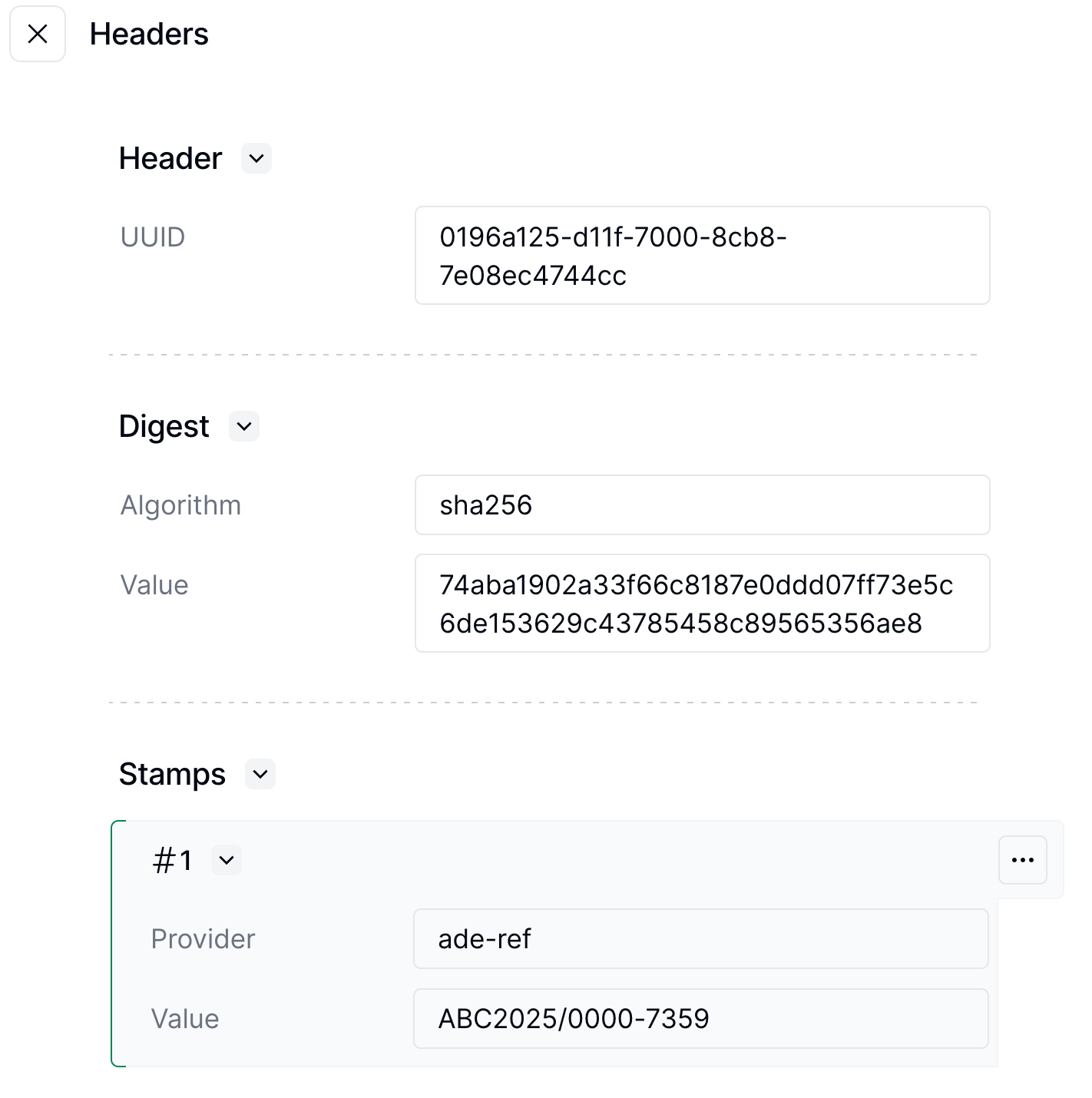
The AdE will automatically generate a document number for the invoice. Once the invoice is sent, you will find the document number in a stamp inside the document header.

<Frame>
  <img src="https://mintcdn.com/invopop-link-fix/1lP6Ab0d1FMqmHMb/assets/guides/it-ticket-invoice-stamp.png?fit=max&auto=format&n=1lP6Ab0d1FMqmHMb&q=85&s=ac7eeb9896446d0729be2da90764e357" alt="Invoice Stamp" width="1422" height="1430" data-path="assets/guides/it-ticket-invoice-stamp.png" />
</Frame>

### Refund an invoice

Refund processing is handled through corrective invoices, which you can issue using the same workflow as regular invoices. See the "Corrective Invoice" accordion above for details and examples.

### Void an invoice

You can void an invoice if it was issued in error, such as when a receipt is accidentally sent twice. To void an invoice:

1. Locate the [silo entry uuid](/api-ref/silo/entries/fetch-an-entry) of the invoice
2. Run the "Void Italian Smart Receipts" workflow with this uuid

<Warning>
  You can only void invoices that were originally sent through this app during the same business day.
</Warning>

## FAQ

<AccordionGroup>
  <Accordion title="How do I configure my workspace for Italian invoicing?">
    Install the SDI Italy app for B2B/B2G/B2C structured invoicing, or the Smart Receipts app for B2C-only AdE CF receipts. Run invoices through the Generate FatturaPA + Send to SDI workflow.
  </Accordion>

  <Accordion title="Where do I find Italy-specific GOBL documentation?">
    See the [Italy tax regime in GOBL](https://docs.gobl.org/regimes/it) for tax categories, codice fiscale rules, and SDI-specific extensions. The [`it-sdi-v1`](https://docs.gobl.org/addons/it-sdi-v1) addon documents required FatturaPA fields.
  </Accordion>

  <Accordion title="How do I correct mistakes in an issued AdE CF invoice?">
    You cannot modify an AdE CF invoice after issuing it. Instead you must:

    1. Void the incorrect invoice using the "Void AdE CF Invoices" workflow
    2. Issue a new invoice with the correct information
  </Accordion>

  <Accordion title="Do I still need to add a series and code to the invoice?">
    We recommend adding a series and code to the invoice so that you can keep track internally even though the AdE will generate a document number.
  </Accordion>

  <Accordion title="Is AdE CF a substitute for SDI?">
    AdE CF is **not** a substitute for [SDI](/guides/it-sdi-sending). SDI is the main channel for issuing electronic invoices in Italy; Invopop issues FatturaPA documents through it. AdE CF should only be used when customer information is not available, like in online B2C scenarios.
  </Accordion>

  <Accordion title="What GOBL fields are required for Smart Receipts?">
    Use the standard GOBL invoice with the simplified tag. No customer tax ID is required. The `it-ticket-v1` addon handles the AdE CF-specific fields. Each receipt gets a unique Lottery Code if the lottery functionality is enabled.
  </Accordion>
</AccordionGroup>

More available in our [Italy FAQ](/faq/italy) section

***

<AccordionGroup>
  <Accordion title="🇮🇹 Invopop resources for Italy">
    |            |                                                                                                                                                                                                                                                                                                                                                                                         |
    | ---------- | --------------------------------------------------------------------------------------------------------------------------------------------------------------------------------------------------------------------------------------------------------------------------------------------------------------------------------------------------------------------------------------- |
    | Compliance | <Icon icon="https://assets.invopop.com/flags/it.svg" /> [Invoicing compliance in Italy](/compliance/italy)<br /> <Icon icon="timeline" /> [Compliance timeline](/timelines/italy)                                                                                                                                                                                                       |
    | Apps       | <Icon icon="https://assets.invopop.com/apps/sdi-italy/icon.svg" /> [SDI Italy](/apps/sdi-italy)<br /><Icon icon="https://assets.invopop.com/apps/agenzia-entrate/icon.svg" /> [Smart Receipts Italy](/apps/smart-receipts-italy)                                                                                                                                                        |
    | Guides     | <Icon icon="book" /> [SDI sending guide](/guides/it-sdi-sending)<br /><Icon icon="book" /> [SDI receiving guide](/guides/it-sdi-receiving)<br /><Icon icon="book" /> [Smart Receipts supplier registration](/guides/it-ticket-supplier)<br /><Icon icon="book" /> [Smart Receipts issuing guide](/guides/it-ticket)                                                                     |
    | FAQ        | <Icon icon="square-question" /> [Italy FAQ](/faq/italy)                                                                                                                                                                                                                                                                                                                                 |
    | GOBL       | <Icon icon="https://assets.invopop.com/icons/gobl.svg" />  [Italy Tax Regime](https://docs.gobl.org/regimes/it)<br /> <Icon icon="https://assets.invopop.com/icons/gobl.svg" /> [Italy SDI FatturaPA Addon](https://docs.gobl.org/addons/it-sdi-v1)<br /> <Icon icon="https://assets.invopop.com/icons/gobl.svg" /> [Italy AdE Ticket Addon](https://docs.gobl.org/addons/it-ticket-v1) |
    | GitHub     | <Icon icon="github" /> [gobl.fatturapa](https://github.com/invopop/gobl.fatturapa)                                                                                                                                                                                                                                                                                                      |
  </Accordion>
</AccordionGroup>

<Card title="Participate in our community" icon="forumbee" href="https://community.invopop.com" arrow="true" horizontal>
  Ask and answer questions about invoicing in Italy →
</Card>