> ## Documentation Index
> Fetch the complete documentation index at: https://invopop-link-fix.mintlify.site/llms.txt
> Use this file to discover all available pages before exploring further.

# SDI receiving invoices guide

> Receive and process electronic invoices from Italy's SDI system

export const itSdiImportInvoicesWorkflow = {
  "name": "SDI import invoice",
  "description": "Import an invoice received through SDI",
  "schema": "bill/invoice",
  "steps": [{
    "id": "6e8f0b30-fd13-11ef-998c-e97f18c9212e",
    "name": "Import invoice from SDI",
    "provider": "sdi-it.import",
    "summary": "Convert received FatturaPA to GOBL",
    "config": {
      "environment": "production"
    }
  }, {
    "id": "b3e17a92-7c5d-11f1-9c40-92000767c8b7",
    "name": "Archive document for legal preservation",
    "provider": "sdi-it.archive.store",
    "summary": "Preserve invoice and store its receipt",
    "config": {
      "environment": "production",
      "flow": "received"
    }
  }, {
    "id": "7f9a1c40-fd13-11ef-998c-e97f18c9212e",
    "name": "Generate PDF",
    "provider": "pdf",
    "summary": "Italian · A4",
    "config": {
      "date_format": "%Y-%m-%d",
      "locale": "it",
      "logo_height": 40
    }
  }, {
    "id": "8a0b2d50-fd13-11ef-998c-e97f18c9212e",
    "name": "Set state",
    "provider": "silo.state",
    "summary": "Set state to `sent`{.state .sent}",
    "config": {
      "state": "sent"
    }
  }],
  "rescue": [{
    "id": "9b1c3e60-fd13-11ef-998c-e97f18c9212e",
    "name": "Set state",
    "provider": "silo.state",
    "summary": "Set state to `error`{.state .error}",
    "config": {
      "state": "error"
    }
  }]
};

export const itSdiRegisterCustomerWorkflow = {
  "name": "SDI register customer",
  "description": "Register a customer with SDI to receive invoices",
  "schema": "org/party",
  "steps": [{
    "id": "2a34f560-fd13-11ef-998c-e97f18c9212e",
    "name": "Set state",
    "provider": "silo.state",
    "summary": "Set state to `processing`{.state .processing}",
    "config": {
      "state": "processing"
    }
  }, {
    "id": "3b5c7890-fd13-11ef-998c-e97f18c9212e",
    "name": "Register party with SDI",
    "provider": "sdi-it.register",
    "summary": "Register company as receiver",
    "config": {
      "environment": "production"
    }
  }, {
    "id": "c1096edb-7b8b-11f1-a196-92000767c8b7",
    "name": "Register party for e-archiving",
    "provider": "sdi-it.archive.register",
    "summary": "Register company for legal preservation",
    "config": {
      "environment": "production"
    }
  }, {
    "id": "4c6d8910-fd13-11ef-998c-e97f18c9212e",
    "name": "Set state",
    "provider": "silo.state",
    "summary": "Set state to `registered`{.state .registered}",
    "config": {
      "state": "registered"
    }
  }],
  "rescue": [{
    "id": "5d7e9a20-fd13-11ef-998c-e97f18c9212e",
    "name": "Set state",
    "provider": "silo.state",
    "summary": "Set state to `error`{.state .error}",
    "config": {
      "state": "error"
    }
  }]
};

export const WorkflowDiagram = ({workflow}) => {
  const stateColors = {
    processing: "yellow",
    sent: "blue",
    received: "blue",
    registered: "green",
    completed: "green",
    error: "red"
  };
  const StateChip = ({state, label}) => <Badge size="sm" color={stateColors[state] || "gray"} icon="square-small" iconType="solid">
      {label.charAt(0).toUpperCase() + label.slice(1)}
    </Badge>;
  const providerIcons = {
    "silo.state": "https://silo.invopop.com/images/status.svg",
    "silo.close": "https://silo.invopop.com/images/check-badge.svg",
    "silo.if": "https://assets.invopop.com/apps/silo/if.svg",
    "silo.folder": "https://silo.invopop.com/images/folder.svg",
    "silo.modify": "https://silo.invopop.com/images/modify.svg",
    "silo.correct": "https://silo.invopop.com/images/replace.svg",
    "silo.sleep": "https://assets.invopop.com/icons/sleep.svg",
    silo: "https://assets.invopop.com/apps/silo/icon.svg",
    "sequence.enumerate": "https://sequence.invopop.com/images/enumerate.svg",
    "transform.job.create": "https://transform.invopop.com/images/jobs.svg",
    webhook: "https://webhook.invopop.com/icon.svg",
    lookup: "https://lookup.invopop.com/icon.png",
    dropbox: "https://dropbox.invopop.com/icon.png",
    pdf: "https://pdf.invopop.com/file-pdf.svg",
    peppol: "https://assets.invopop.com/apps/peppol/icon.svg",
    ubl: "https://assets.invopop.com/apps/ubl/logo.svg",
    cii: "https://assets.invopop.com/apps/cii/logo.svg",
    "gov-fr": "https://assets.invopop.com/flags/fr.svg",
    "chorus-pro": "https://assets.invopop.com/apps/chroruspro/icon.svg",
    "gov-es": "https://assets.invopop.com/apps/gov-es/icon.svg",
    "gov-es.sii": "https://assets.invopop.com/apps/sii/icon.svg",
    "gov-es.ticketbai": "https://assets.invopop.com/apps/ticketbai/icon.svg",
    "gov-es.facturae": "https://assets.invopop.com/apps/facturae/icon.svg",
    verifactu: "https://assets.invopop.com/apps/verifactu/icon.svg",
    "gov-pl": "https://assets.invopop.com/apps/ksef/icon.svg",
    "gov-sa": "https://assets.invopop.com/apps/zatca/icon.svg",
    "gov-ar": "https://assets.invopop.com/apps/arca/icon.svg",
    "at-pt": "https://assets.invopop.com/apps/at-pt/icon.svg",
    "sat-mx": "https://assets.invopop.com/apps/sat-mexico/icon.svg",
    "sw-sapien": "https://assets.invopop.com/apps/sw-sapien/icon.svg",
    "sdi-it": "https://assets.invopop.com/apps/sdi-italy/icon.svg",
    "ticket-it": "https://assets.invopop.com/apps/agenzia-entrate/icon.svg",
    "nfe-br": "https://assets.invopop.com/apps/notas-fiscais-eletronicas-brazil/icon.svg",
    chargebee: "https://assets.invopop.com/apps/chargebee/icon.svg",
    stripe: "https://assets.invopop.com/apps/stripe/icon.svg",
    email: "https://assets.invopop.com/apps/email/icon.svg",
    cron: "https://assets.invopop.com/apps/cron/icon.svg",
    ilyda: "https://assets.invopop.com/apps/ilyda/icon.svg",
    invoicexpress: "https://assets.invopop.com/apps/invoicexpress/icon.svg",
    plemsi: "https://assets.invopop.com/flags/co.svg"
  };
  const iconFor = provider => {
    const parts = (provider || "").split(".");
    for (let i = parts.length; i > 0; i--) {
      const url = providerIcons[parts.slice(0, i).join(".")];
      if (url) return url;
    }
    return null;
  };
  const StepIcon = ({provider}) => {
    const url = iconFor(provider);
    return <span title={provider} className="flex h-7 w-7 shrink-0 items-center justify-center rounded-md border border-gray-950/10 bg-white dark:border-white/10 dark:bg-white/5">
        {url ? <img src={url} alt="" className="h-4 w-4" /> : null}
      </span>;
  };
  const renderSummary = summary => {
    const nodes = [];
    const re = /`([^`]+)`(\{[^}]*\})?/g;
    let last = 0;
    let m;
    let k = 0;
    while ((m = re.exec(summary)) !== null) {
      if (m.index > last) nodes.push(summary.slice(last, m.index));
      const attrs = m[2] || "";
      if (attrs.indexOf(".state") >= 0) {
        const state = (attrs.match(/\.state\s+\.([\w-]+)/) || [])[1] || m[1];
        nodes.push(<StateChip key={k++} state={state} label={m[1]} />);
      } else if (attrs) {
        nodes.push(<span key={k++} className="text-sm font-medium text-gray-700 dark:text-gray-300">
            {m[1]}
          </span>);
      } else {
        nodes.push(<code key={k++} className="text-sm rounded bg-gray-100 px-1 font-mono text-sm dark:bg-white/10">
            {m[1]}
          </code>);
      }
      last = m.index + m[0].length;
    }
    if (last < summary.length) nodes.push(summary.slice(last));
    return nodes;
  };
  const NoteRow = ({text}) => <div className="mt-4 mb-1 font-mono text-sm leading-5 text-gray-400 dark:text-gray-500">{"// " + text}</div>;
  const renderSteps = (steps, counter) => (steps || []).map(step => {
    counter.n += 1;
    const n = counter.n;
    const branches = (step.next || []).filter(b => b.steps && b.steps.length > 0);
    return <div key={step.id || "step-" + n}>
          {step.notes ? <NoteRow text={step.notes} /> : null}
          <div className="mt-2.5 flex items-center">
            <span className="absolute left-0 w-10 text-center font-mono text-sm text-gray-400 select-none dark:text-gray-500">
              {n}
            </span>
            <div className="flex min-w-0 flex-1 items-center gap-2 rounded-xl border border-gray-950/5 bg-white px-2 py-2 dark:border-white/10 dark:bg-gray-900">
              <StepIcon provider={step.provider} />
              <span className="text-sm shrink-0 font-medium text-gray-900 dark:text-gray-100">{step.name}</span>
              {step.summary ? <span className="text-sm min-w-0 truncate text-gray-500 dark:text-gray-400">{renderSummary(step.summary)}</span> : null}
            </div>
          </div>
          {branches.length > 0 ? <div className="ml-5 border-l border-gray-200 -my-1 py-1 pl-6 dark:border-white/10">
              {branches.map((branch, bi) => <div key={branch.code || branch.status || bi}>
                  <div className="mt-4">
                    <span className="rounded-md bg-gray-200/70 px-2 py-1 font-mono text-sm text-gray-600 dark:bg-white/10 dark:text-gray-300">
                      {branch.code || branch.status}
                    </span>
                  </div>
                  {renderSteps(branch.steps, counter)}
                </div>)}
            </div> : null}
        </div>;
  });
  const counter = {
    n: 0
  };
  const wf = workflow || ({});
  return <div className="not-prose relative my-5 rounded-2xl border border-gray-950/5 bg-gray-50 py-3 pr-4 pb-5 pl-12 dark:border-white/10 dark:bg-white/[0.03]">
      {renderSteps(wf.steps, counter)}
      {wf.rescue && wf.rescue.length > 0 ? <div className="mt-6 border-t border-dashed border-gray-300 dark:border-white/10">
          <NoteRow text="If any step fails" />
          {renderSteps(wf.rescue, counter)}
        </div> : null}
    </div>;
};

## Introduction

The SDI system operates using a standardized XML format called FatturaPA, which ensures all invoices contain the required information and comply with the strict validation rules established by the Italian tax authority (*Agenzia delle Entrate*). To ensure proper routing of invoices to the correct recipient, the SDI system uses a unique identifier called a Recipient Code, which is assigned to each registered SDI provider.

To receive FatturaPA XML documents, Invopop uses the [GOBL FatturaPA](https://github.com/invopop/gobl.fatturapa) library to automatically process conversions into [GOBL](https://docs.gobl.org) format.

Detailed information about the SDI-specific extensions and validations can be found in:

* [Italy SDI FatturaPA v1.x Addon Documentation](https://docs.gobl.org/addons/it-sdi-v1)
* [Italy Tax Regime Documentation](https://docs.gobl.org/regimes/it)

| -               | Sandbox                                        | Live                                                   |
| --------------- | ---------------------------------------------- | ------------------------------------------------------ |
| **Supplier**    | Skip — Invopop simulates receiving environment | Must register Recipient Code at Agenzia Entrate        |
| **Environment** | Test                                           | Must select `Production` when registering SDI Customer |

## Setup

<Steps>
  <Step title="Connect the SDI Italy app">
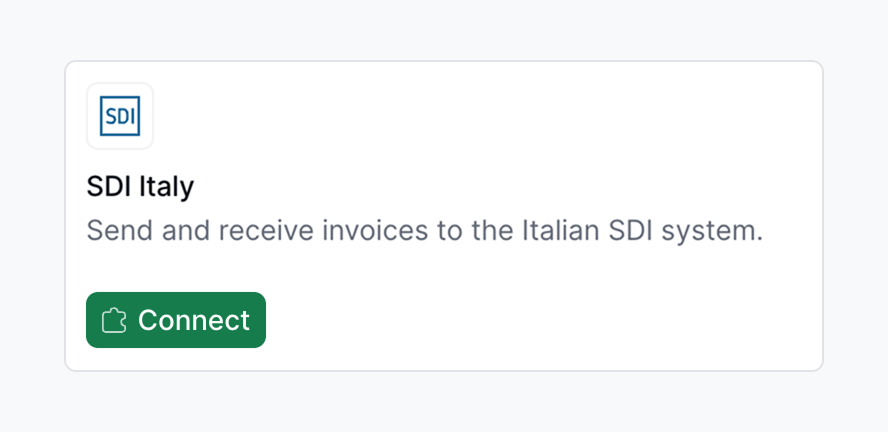
    1. Navigate to **Configuration** → **Apps**
    2. Locate **SDI Italy** in the app discovery list
    3. Tap **Connect** to activate

    <Frame>
      <img width="500" src="https://mintcdn.com/invopop-link-fix/1lP6Ab0d1FMqmHMb/assets/guides/it-sdi-connect.png?fit=max&auto=format&n=1lP6Ab0d1FMqmHMb&q=85&s=7f394b36049986a167ec67a1751addcf" alt="Connect SDI Italy app" data-path="assets/guides/it-sdi-connect.png" />
    </Frame>

    Unlike sending, receiving invoices requires additional configuration after the initial connection.
  </Step>

  <Step title="Set up the Customer Registration Workflow">
    Use this workflow to register a company to receive invoices through SDI.

    <Card iconType="duotone" title="SDI register party workflow" icon="code-branch" href="https://console.invopop.com/redirect/workflows/new?template=it-sdi-register-customer" horizontal>
      Add to my workspace →
    </Card>

    <Tabs>
      <Tab title="Workflow">
        <WorkflowDiagram workflow={itSdiRegisterCustomerWorkflow} />
      </Tab>

      <Tab title="Code">
        Copy and paste into a new [Empty Party workflow](https://console.invopop.com/redirect/workflows/new?template=empty-party) code view.

        ```json Example SDI register customer workflow theme={null}
        {
          "name": "SDI register customer",
          "description": "Register a customer with SDI to receive invoices",
          "schema": "org/party",
          "steps": [
            {
              "id": "2a34f560-fd13-11ef-998c-e97f18c9212e",
              "name": "Set state",
              "provider": "silo.state",
              "summary": "Set state to `processing`{.state .processing}",
              "config": {
                "state": "processing"
              }
            },
            {
              "id": "3b5c7890-fd13-11ef-998c-e97f18c9212e",
              "name": "Register party with SDI",
              "provider": "sdi-it.register",
              "summary": "Register company as receiver",
              "config": {
                "environment": "production"
              }
            },
            {
              "id": "c1096edb-7b8b-11f1-a196-92000767c8b7",
              "name": "Register party for e-archiving",
              "provider": "sdi-it.archive.register",
              "summary": "Register company for legal preservation",
              "config": {
                "environment": "production"
              }
            },
            {
              "id": "4c6d8910-fd13-11ef-998c-e97f18c9212e",
              "name": "Set state",
              "provider": "silo.state",
              "summary": "Set state to `registered`{.state .registered}",
              "config": {
                "state": "registered"
              }
            }
          ],
          "rescue": [
            {
              "id": "5d7e9a20-fd13-11ef-998c-e97f18c9212e",
              "name": "Set state",
              "provider": "silo.state",
              "summary": "Set state to `error`{.state .error}",
              "config": {
                "state": "error"
              }
            }
          ]
        }
        ```
      </Tab>
    </Tabs>
  </Step>

  <Step title="Import Invoices Workflow">
    Use this workflow to import and process invoices received through SDI. This workflow must be selected in the SDI Italy app configuration to automatically process incoming invoices.

    <Card iconType="duotone" title="SDI import invoices workflow" icon="code-branch" href="https://console.invopop.com/redirect/workflows/new?template=it-sdi-import-invoices" horizontal>
      Add to my workspace →
    </Card>

    <Tabs>
      <Tab title="Workflow">
        <WorkflowDiagram workflow={itSdiImportInvoicesWorkflow} />
      </Tab>

      <Tab title="Code">
        Copy and paste into a new [Empty Invoice workflow](https://console.invopop.com/redirect/workflows/new?template=empty-invoice) code view.

        ```json Example SDI import invoice workflow theme={null}
        {
          "name": "SDI import invoice",
          "description": "Import an invoice received through SDI",
          "schema": "bill/invoice",
          "steps": [
            {
              "id": "6e8f0b30-fd13-11ef-998c-e97f18c9212e",
              "name": "Import invoice from SDI",
              "provider": "sdi-it.import",
              "summary": "Convert received FatturaPA to GOBL",
              "config": {
                "environment": "production"
              }
            },
            {
              "id": "b3e17a92-7c5d-11f1-9c40-92000767c8b7",
              "name": "Archive document for legal preservation",
              "provider": "sdi-it.archive.store",
              "summary": "Preserve invoice and store its receipt",
              "config": {
                "environment": "production",
                "flow": "received"
              }
            },
            {
              "id": "7f9a1c40-fd13-11ef-998c-e97f18c9212e",
              "name": "Generate PDF",
              "provider": "pdf",
              "summary": "Italian · A4",
              "config": {
                "date_format": "%Y-%m-%d",
                "locale": "it",
                "logo_height": 40
              }
            },
            {
              "id": "8a0b2d50-fd13-11ef-998c-e97f18c9212e",
              "name": "Set state",
              "provider": "silo.state",
              "summary": "Set state to `sent`{.state .sent}",
              "config": {
                "state": "sent"
              }
            }
          ],
          "rescue": [
            {
              "id": "9b1c3e60-fd13-11ef-998c-e97f18c9212e",
              "name": "Set state",
              "provider": "silo.state",
              "summary": "Set state to `error`{.state .error}",
              "config": {
                "state": "error"
              }
            }
          ]
        }
        ```
      </Tab>
    </Tabs>
  </Step>

  <Step title="Configure the app for receiving invoices">
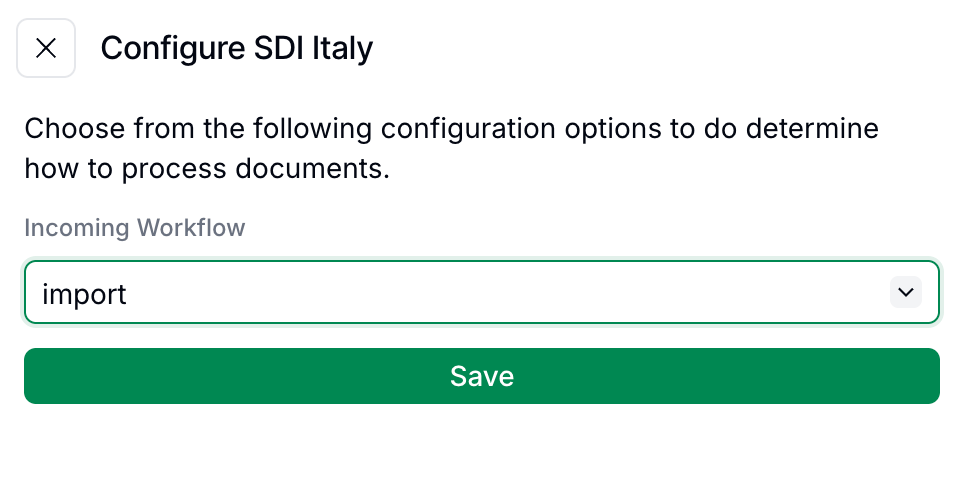
    To start processing incoming invoices navigate to **Configuration** → **Apps**, find the **SDI Italy** app and tap **Configure** and select the appropriate **Import Invoices** workflow

    <Frame>
      <img width="450" src="https://mintcdn.com/invopop-link-fix/1lP6Ab0d1FMqmHMb/assets/guides/it-sdi-configure-panel.png?fit=max&auto=format&n=1lP6Ab0d1FMqmHMb&q=85&s=658edc2da1db30f0253598035d81a8a9" alt="Select Import Invoices workflow" data-path="assets/guides/it-sdi-configure-panel.png" />
    </Frame>

    This workflow will automatically trigger whenever a new invoice is received through SDI. Any errors in the import process will trigger the rescue steps in the workflow, allowing identification and resolution of issues.
  </Step>

  <Step title="Register with Italian tax authority (live only)">
    <Note>
      In Sandbox skip this step, as Invopop simulates the receiving environment.
    </Note>

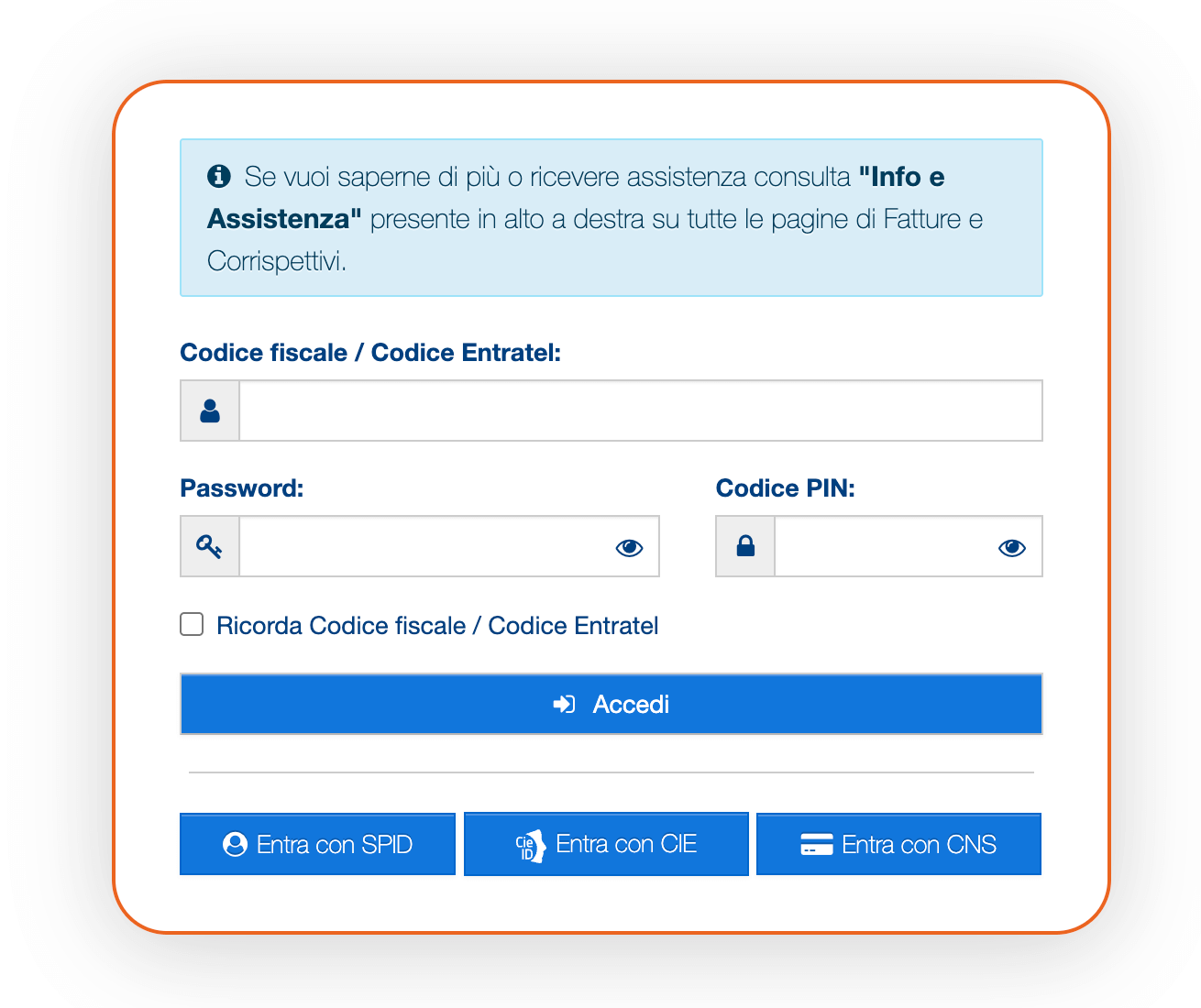
    For each company you want to receive invoices, register the Recipient Code (Codice Destinatario) at Agenzia Entrate.

    1. Access the [Italian tax authority's website](https://ivaservizi.agenziaentrate.gov.it/portale/) and log in with valid credentials for the company being registered.

    <Frame>
      <img width="600" src="https://mintcdn.com/invopop-link-fix/1lP6Ab0d1FMqmHMb/assets/guides/it-sdi-register.png?fit=max&auto=format&n=1lP6Ab0d1FMqmHMb&q=85&s=529b0d7531c2c4c63d7b04bc55dbc952" alt="Register with Italian tax authority" data-path="assets/guides/it-sdi-register.png" />
    </Frame>

    2. Tap on the **Fatture e Corrispettivi** section.
    3. In the box **Fatturazione elettronica**, tap on **Registrazione delle modalità di ricezione della fattura elettronica**.
    4. Select the Recipient Code (*Codice Destinatario*) option and enter the code `JKKZDGR` provided by Invopop
    5. Tap on **Conferma**

    <Tip>
      Make sure you notify the companies about their new Codice Destinatario. It works as a routing identifier that tells the SDI system where to deliver incoming electronic invoices. Invoices sent to an outdated Codice Destinatario will be rejected.
    </Tip>
  </Step>

  <Step title="Run the Customer Registration workflow in Invopop">
    In Invopop, execute the [customer registration](#set-up-the-customer-registration-workflow) workflow on the supplier's silo entry to complete the setup for that company.
  </Step>
</Steps>

<Warning>
  In live workspaces make sure you both register Codice Destinatario `JKKZDGR` and run the customer registration workflow. Registration is only needed for receiving invoices, not sending.
</Warning>

## Receiving invoices

Once registered, any invoices addressed to the registered companies with the Recipient Code will be automatically received and processed through the Import Invoices workflow configured in the app settings. Received invoices will appear in your **Expenses** folder.

If errors occur during the import process, they will trigger the rescue steps in the workflow, allowing users to check what went wrong and take appropriate action.

## FAQ

<AccordionGroup>
  <Accordion title="How do I import received invoices in Italy?">
    Register the recipient with SDI using Invopop's Recipient Code (`JKKZDGR`) and run the Customer Registration workflow. Invopop automatically receives matching invoices and routes them through the configured Import workflow.
  </Accordion>

  <Accordion title="How does Invopop convert received Italian invoices into GOBL?">
    Inbound FatturaPA XMLs are parsed via [`gobl.fatturapa`](https://github.com/invopop/gobl.fatturapa). The original signed XML is preserved as a silo entry attachment alongside the GOBL representation.
  </Accordion>

  <Accordion title="What happens if a received invoice contains errors?">
    If an invoice received through SDI contains errors:

    1. The import process will still attempt to convert it to [GOBL](https://docs.gobl.org) format
    2. Any validation errors will be logged, and the rescue steps in your workflow will be triggered
    3. You can review the errors and decide how to handle the invoice

    If the invoice has significant structural issues that prevent conversion, you may need to contact the sender to request a corrected invoice.
  </Accordion>

  <Accordion title="How quickly are invoices received after being sent by suppliers?">
    Invoices are typically received within minutes after being sent by suppliers through SDI. The automatic import process in Invopop processes them as soon as they are received by our system.
  </Accordion>

  <Accordion title="Can I register multiple companies to receive invoices?">
    Yes, multiple companies can be registered to receive invoices through a single Invopop workspace. For each company, you must:

    1. Register the Recipient Code `JKKZDGR` with the Italian tax authority for that specific company
    2. Have its tax ID registered using the Customer Registration workflow in Invopop
    3. Use the same Import Invoices workflow configured in the app settings

    This two-step registration process (with the tax authority and with Invopop) must be completed for each company you want to register. This is particularly useful for white-labeling scenarios where a user manages multiple entities.
  </Accordion>

  <Accordion title="What is the difference between registering with the tax authority and registering with Invopop?">
    The two-step registration process serves different purposes:

    1. **Registering with the Italian tax authority** - Tells SDI to route invoices addressed to your company to Invopop's system using the *Codice Destinatario* `JKKZDGR`.

    2. **Registering with Invopop** (Customer Registration workflow) - Tells Invopop's system which invoices to accept and process for your workspace.

    Both steps are necessary: the first routes the invoices to Invopop, and the second ensures Invopop knows which workspace should receive those invoices.
  </Accordion>

  <Accordion title="What format do received SDI invoices arrive in?">
    Signed FatturaPA XML (versions 1.2.x), conforming to the Agenzia delle Entrate schema. The signature is XAdES; SDI's own *Notifica di Esito Committente* envelopes the document during transmission.
  </Accordion>
</AccordionGroup>

More available in our [Italy FAQ](/faq/italy) section

***

<AccordionGroup>
  <Accordion title="🇮🇹 Invopop resources for Italy">
    |            |                                                                                                                                                                                                                                                                                                                                                                                         |
    | ---------- | --------------------------------------------------------------------------------------------------------------------------------------------------------------------------------------------------------------------------------------------------------------------------------------------------------------------------------------------------------------------------------------- |
    | Compliance | <Icon icon="https://assets.invopop.com/flags/it.svg" /> [Invoicing compliance in Italy](/compliance/italy)<br /> <Icon icon="timeline" /> [Compliance timeline](/timelines/italy)                                                                                                                                                                                                       |
    | Apps       | <Icon icon="https://assets.invopop.com/apps/sdi-italy/icon.svg" /> [SDI Italy](/apps/sdi-italy)<br /><Icon icon="https://assets.invopop.com/apps/agenzia-entrate/icon.svg" /> [Smart Receipts Italy](/apps/smart-receipts-italy)                                                                                                                                                        |
    | Guides     | <Icon icon="book" /> [SDI sending guide](/guides/it-sdi-sending)<br /><Icon icon="book" /> [SDI receiving guide](/guides/it-sdi-receiving)<br /><Icon icon="book" /> [Smart Receipts supplier registration](/guides/it-ticket-supplier)<br /><Icon icon="book" /> [Smart Receipts issuing guide](/guides/it-ticket)                                                                     |
    | FAQ        | <Icon icon="square-question" /> [Italy FAQ](/faq/italy)                                                                                                                                                                                                                                                                                                                                 |
    | GOBL       | <Icon icon="https://assets.invopop.com/icons/gobl.svg" />  [Italy Tax Regime](https://docs.gobl.org/regimes/it)<br /> <Icon icon="https://assets.invopop.com/icons/gobl.svg" /> [Italy SDI FatturaPA Addon](https://docs.gobl.org/addons/it-sdi-v1)<br /> <Icon icon="https://assets.invopop.com/icons/gobl.svg" /> [Italy AdE Ticket Addon](https://docs.gobl.org/addons/it-ticket-v1) |
    | GitHub     | <Icon icon="github" /> [gobl.fatturapa](https://github.com/invopop/gobl.fatturapa)                                                                                                                                                                                                                                                                                                      |
  </Accordion>
</AccordionGroup>

<Card title="Participate in our community" icon="forumbee" href="https://community.invopop.com" arrow="true" horizontal>
  Ask and answer questions about invoicing in Italy →
</Card>